
Someone messaged me last week asking "what license do I actually need for this kiosk in the lobby" and I gave a confident answer that was wrong. Not because I dont know Intune, but because the licensing side of it is scattered across like four different Microsoft pages and none of them agree on vocabulary. So I went and actually sorted it out properly, and figured I'd write it down before I forget it again.
This is the "what license do I need" post. Not pricing, pricing changes constantly and I'm not going to lie to you about numbers that'll be wrong in six months. Just what each license actually covers and when you'd reach for it.
The three Intune plans
Underneath everything, Intune capability is split into three plans. Doesnt matter what bundle you bought, the docs and the admin center both talk in these terms:
- Intune Plan 1, the base service. Device enrollment, compliance policies, app protection, config profiles. This covers most of what people think of as "Intune."
- Intune Plan 2, additive on top of Plan 1. Adds things like Remote Help and Advanced Analytics.
- Intune Suite, additive on top of Plan 1 as well, and it includes everything in Plan 2. This is the one with Cloud PKI, Endpoint Privilege Management, Enterprise Application Management, that kind of thing.
Most people never buy these three directly though. They come bundled.
How you actually get it
Realistically almost nobody buys "Intune Plan 1" as a standalone SKU on purpose. You get it through one of these:
- Microsoft 365 E3, E5, or E7, commercial plans, Intune comes bundled at increasing plan levels
- Enterprise Mobility + Security (EMS) E3 or E5, this was the original way to get Intune plus Entra ID P1 or P2 without buying full Microsoft 365
- Microsoft 365 Business Premium, for the small and mid sized business crowd
- Microsoft 365 Education A3 or A5, includes Intune for Education, more on that in a second
- Microsoft 365 F1/F3, the frontline worker tiers, if your org has task workers who dont sit at a desk
If you're not sure which bundle your org has, Microsoft 365 admin center > Billing > Your products will tell you, and so will Intune admin center > Tenant administration > Tenant status > Tenant details, which shows total licensed users and total Intune licenses.
Commercial, education, and government arent the same product
Commercial is what almost everyone reading this is on. Standard Intune admin center, standard everything.
Intune for Education is a separate, simplified admin portal built for schools, at intuneeducation.portal.azure.com instead of the regular admin center. It's included with Microsoft 365 Education A3 or A5, and it trims down the enterprise-grade complexity into something a school IT person can actually manage without a full time job doing it. You can still use full Intune alongside it if you need the deeper features.
Government is its own thing entirely. GCC is actually the same commercial instance everyone else uses, just for state and local government tenants that need extra accreditation. GCC High and DoD are different, they run on a physically separate Azure Government Cloud datacenter (referred to as IL4 and IL5). You cant migrate a device between commercial and government clouds either, it has to unenroll and re-enroll clean.

Assigning the license, step by step
- Microsoft 365 admin center > Users > Active users
- Pick the unlicensed user
- Licenses and apps
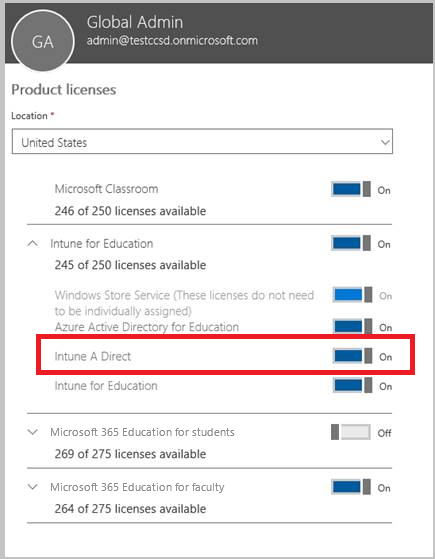
- Check the box for Intune, or for the EMS bundle if thats what you're assigning, then Save changes
Schools using School Data Sync can assign Intune for Education licenses right in the SDS profile setup instead of doing it user by user.
One thing worth knowing, admins dont always need their own Intune license just to manage the service. Tenants created after July 2021 support unlicensed admin access by default, up to 1000 unlicensed admins per security group. Older tenants can turn this on manually under Tenant administration > Roles > Administrator Licensing.
The one everyone forgets: device-only licenses
This is the one that actually started this whole post. If a device isnt tied to a specific person, kiosks, dedicated devices, phone room devices, digital signage, IoT type stuff, you dont necessarily need a full per-user license for it. Intune has a device-only subscription built exactly for this.
Device licenses apply when the device enrolls through one of these paths:
- Windows Autopilot self-deploying mode
- Apple Automated Device Enrollment without user affinity
- Apple School Manager without user affinity
- Apple Configurator without user affinity
- Android Enterprise dedicated devices
- Using a device enrollment manager account
Notice that last one. Device enrollment manager accounts and device-only licenses show up together a lot, because they're both built for the same problem, devices nobody personally owns.
The tradeoff is real though. A device enrolled on a device-only license doesnt get app protection policies, doesnt get Conditional Access, and loses user-based features like email and calendar. Thats fine for a lobby kiosk showing a product catalog. Its not fine if you were hoping to quietly save money by licensing a real employee's laptop this way, that device needs a proper user license because a person is actually using it day to day.
Putting it together
If someone asks you "which Intune license do I need," the real answer is: figure out what bundle your org already has first, because you probably already own Plan 1 through Microsoft 365 or EMS without realizing it. Then check if you're education (Intune for Education, A3/A5) or government (GCC High/DoD is a separate cloud, not just a setting). Then, separately, figure out which of your devices dont belong to a person at all, because those are candidates for a device-only license instead of burning a full user license on a wall-mounted kiosk.
What can we learn as a person
I keep coming back to the device-only license thing. Its basically Microsoft admitting that not everything needs the full package. A kiosk doesnt need email, doesnt need Conditional Access, doesnt need the whole suite, it just needs the bare minimum to do its one job safely. And I think a lot of us hand out the full package to things in our life that only needed the bare minimum. Full emotional investment in a situation that only needed logistics. Full attention on a problem that just needed fifteen minutes. We license everything at Plan 2 when most of it is a device-only situation.
So where in your week are you over licensing something. What's actually just a kiosk, needing the bare minimum from you, that you keep assigning your full user license to?
Further reading
- Microsoft Intune licensing
- Assign licenses to users so they can enroll devices in Intune
- Use Microsoft Intune Suite add-on capabilities
- Microsoft Intune for US Government GCC High and DoD service description
- What is Intune for Education?
- Add device enrollment managers
- Microsoft Intune plans and pricing