

I found a service account last month with a password set in 2016. It ran SQL, it had a service principal name registered, and its password was set to never expire. Someone even helpfully wrote the password in a OneNote called "IT Passwords." That account is a loaded gun pointed at the whole domain, and the fix has been sitting in Active Directory for over a decade. Group Managed Service Accounts kill this problem for good.
If you're hardening AD and you already audited who's in Domain Admins, this is the next box to check. Your service accounts are probably worse.
Why an old service account password is a gift to attackers
Any service account with a registered SPN is kerberoastable. Here's the short version of the problem. Any domain user, even a low-privilege one, can request a Kerberos service ticket for that account. The ticket comes back encrypted with the account's password hash. The attacker takes it offline and brute-forces it at their leisure, with no lockout and no alarm.
A short or old or reused password falls in minutes. And once they crack it, they own whatever that service could touch, which for a SQL account is usually a lot. Microsoft's own guidance for stopping kerberoasting says it plainly. Replace the user account with a Group Managed Service Account.
What Group Managed Service Accounts actually do
A gMSA is a domain account where Active Directory owns the password, not you. When you point a service at one, the operating system takes over credential management completely.
- The password is 240 bytes of random. No human picks it, and no human ever sees it. It never lands in a OneNote.
- It rotates every 30 days on its own. Active Directory changes it automatically, and the member servers pull the new one. Nobody schedules a change or plans an outage.
- It works across a server farm. That's the "group" part. Multiple hosts behind a load balancer can share one gMSA identity.
- It manages the SPN for you. You set the service principal name when you create the account, and Kerberos just works.
Now run the kerberoasting math again. An attacker can still request that ticket. But a 240-byte random password that rotates every 30 days is not getting cracked offline before it changes again. You didnt hide the account. The loot is just worthless now.
First, find your kerberoastable accounts
You cant fix what you havent found. Start by listing every user account that has an SPN, because those are the roastable ones.
Get-ADUser -Filter {ServicePrincipalName -like "*"} -Properties ServicePrincipalName, PasswordLastSet |
    Select-Object name, PasswordLastSet, ServicePrincipalName
Look at that PasswordLastSet column and prepare to wince. If you run Microsoft Defender for Identity, its Service accounts inventory finds these for you, flags the ones with a password set to never expire, and separates real gMSAs from plain user accounts pretending to be service accounts.
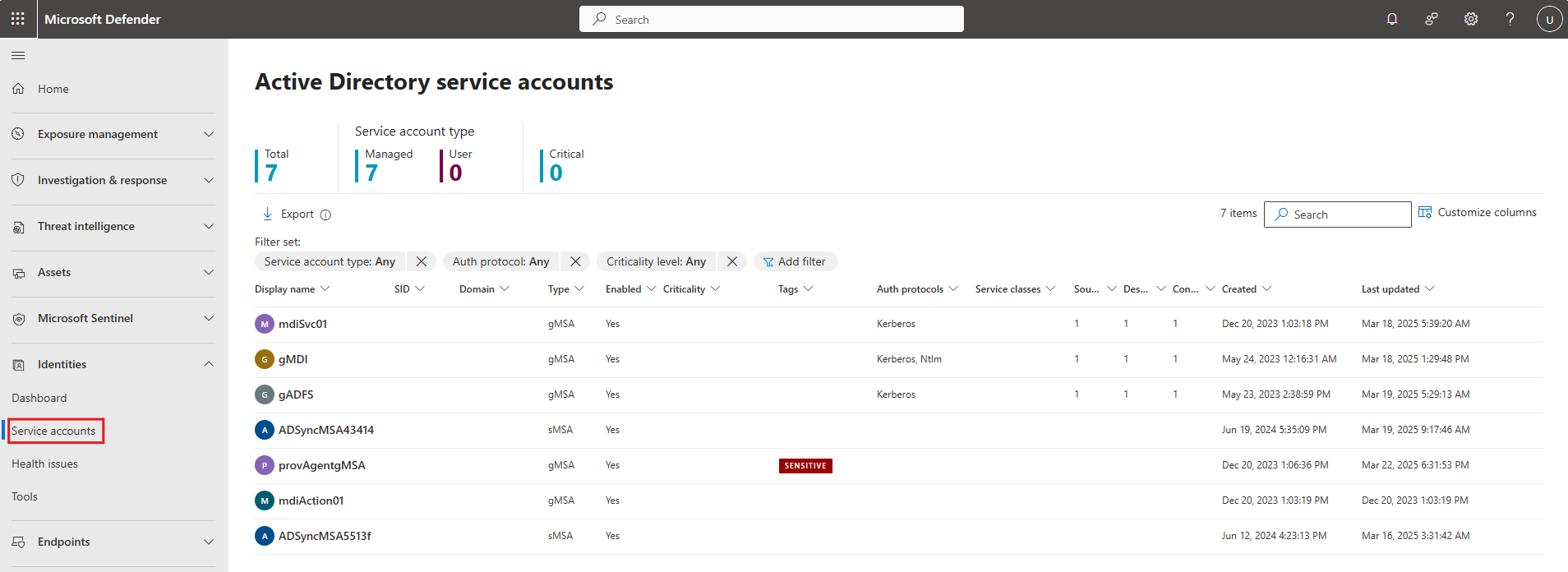
Setting up a gMSA, step by step
You need a 2012 or later domain functional level, a host running 2012 or later, and the AD PowerShell module. From there its four moves.
Create the KDS root key, once per forest
The Key Distribution Service root key is what AD uses to generate gMSA passwords. You only make it once for the whole forest.
Add-KdsRootKey -EffectiveImmediatelyIn production that key needs about 10 hours to replicate before it works, so create it early and go do something else. In a lab, there's a flag to make it effective right away, but dont use that shortcut in prod.
Create a group for the hosts
Make a security group and add the computer accounts that are allowed to use the gMSA. Then create the account and point it at that group.
New-ADServiceAccount -Name svc-sql -DNSHostName svc-sql.contoso.com `
  -PrincipalsAllowedToRetrieveManagedPassword "grp-gMSA-SQL" `
  -ServicePrincipalNames "MSSQLSvc/sql01.contoso.com:1433"
Install and test on the server
On each host in that group, install the account and confirm it works.
Install-ADServiceAccount -Identity svc-sql
Test-ADServiceAccount -Identity svc-sql
Test should return True. If it doesnt, check that the host is in the group and that the group membership has replicated.
Point the service at it
In the service's Log On settings, enter the account as CONTOSO\svc-sql$ and leave the password blank. That trailing dollar sign matters. Start the service and you're done. You will never type that password, because it doesnt have one you could type.
Before you go all in
A few honest limits, because gMSA isnt a fit for absolutely everything.
- Not every app supports it. SQL Server, IIS application pools, and scheduled tasks on modern Windows are fine. Failover clustering isnt, and some third-party apps arent. Test before you commit.
- You cant interactively log on with one. A gMSA runs services, it doesnt sit at a desktop.
- Mind the 10-hour KDS wait. Plan the root key ahead of your first real deployment so you're not stuck waiting.
- Dont put service accounts in Protected Users. That group breaks them. Use a gMSA for the service and Protected Users for your human admins.
Putting it together
Find your SPN user accounts, then replace the important ones with Group Managed Service Accounts. Create the KDS root key once, make a group for the hosts, create the account with New-ADServiceAccount, install and test it on the servers, and repoint the service with a blank password. Active Directory handles a 240-byte password that rotates every month, and the kerberoasting attack that owned your old account just stops working. Start with your SQL accounts, since those are usually the fattest target.
What can we learn as a person
The 2016 password is the thing I cant stop thinking about. It made sense the day someone set it. Then the world kept moving and it never changed, and the exact thing that was supposed to protect the account slowly turned into the easiest way in.
I have passwords like that. Rules I set for myself in a hard year that made total sense then, and I never rotated them. A way of protecting myself that fit who I was at the time, kept unchanged so long that it quietly became the vulnerability instead of the defense. The genius of a gMSA isnt that the password is strong. It's that it never stops changing, so no single old version of it can be used against me forever.
So whats your 2016 password? What defense did you set once, a long time ago, that you've never once rotated since?