
You built the tiers. Domain admins cant log into workstations anymore, the deny-logon GPOs are humming, and you feel pretty good. Then a red team drops a report showing they lifted a Tier 0 credential and replayed it from a jump box you forgot about. The tier model told the account where it couldnt log in. It never told Kerberos where the credential was allowed to come from. That gap is exactly what the Protected Users group and Authentication Policy Silos close.
This is the follow-up to the tiered AD model. Tiering draws the boundary. These two features weld it shut.
Two features, two different jobs
People lump these together, but they solve different halves of the same problem.
- Protected Users hardens the credential itself. No caching, Kerberos only, short lifetime. It makes the credential hard to steal in the first place.
- Authentication Policy Silos pin the credential to specific machines. Even a stolen credential wont authenticate from the wrong host, because Kerberos refuses it.
One makes the key hard to copy. The other makes the copied key useless anywhere but the right lock. Run them together and a leaked Tier 0 account stops being a company-ending event.
Protected Users: hardening the credential
Protected Users is a built-in global security group. Drop an account in it and Active Directory applies a set of protections you cant configure or turn off. Thats the point. Nobody, including a helpful admin under pressure, can weaken them.
When a member signs in, they get this treatment:
- No NTLM, no Digest, no CredSSP credential delegation. Kerberos only.
- No DES or RC4. The account uses AES, which means it actually needs AES keys.
- No cached credentials and no cached verifier, so offline sign-in stops working for that account.
- No Kerberos delegation, constrained or unconstrained.
- A Kerberos TGT lifetime locked to four hours, non-renewable. After four hours, authenticate again.
Add a user through Active Directory Users and Computers, the Active Directory Administrative Center, or PowerShell with Add-ADGroupMember "Protected Users" -Members t0-jsmith. Your domain functional level needs to be 2012 R2 or higher.
The three ways people lock themselves out
This group bites back if you rush it. Watch these:
- Never add computer or service accounts. Incoming authentication fails outright, and the password already lives on the host anyway, so it buys you nothing.
- Reset the password after an account migration. An account without AES keys cant authenticate once its protected. Reset forces the AES hash.
- Dont bulk-add Domain Admins on a Friday. Test first. A privileged account that relies on NTLM somewhere will break, and you'll be the one explaining why.
One more thing worth knowing. The built-in Administrator account, RID 500, is always exempt from authentication policies. Keep one as break-glass, outside all of this, in a safe.
Authentication Policy Silos: pinning the credential to hosts
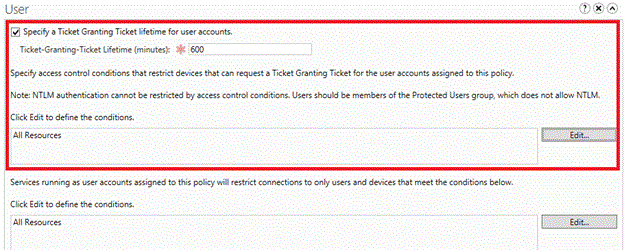
Protected Users shortens the fuse. Authentication Policy Silos decide where the account is even allowed to light it. A silo is a container you drop accounts into, and the policy attached to it sets two things: the Kerberos TGT lifetime, and access-control conditions for which devices the account can authenticate from.
Here's the use case that matters for a tiered environment. Create a Tier 0 silo. Assign your t0- admin accounts to it. Set a policy saying those accounts can only authenticate from domain controllers and Tier 0 privileged access workstations. Now a stolen Tier 0 credential typed on a random laptop gets rejected by the domain controller before it does anything. The credential is welded to its tier.
Building one, step by step
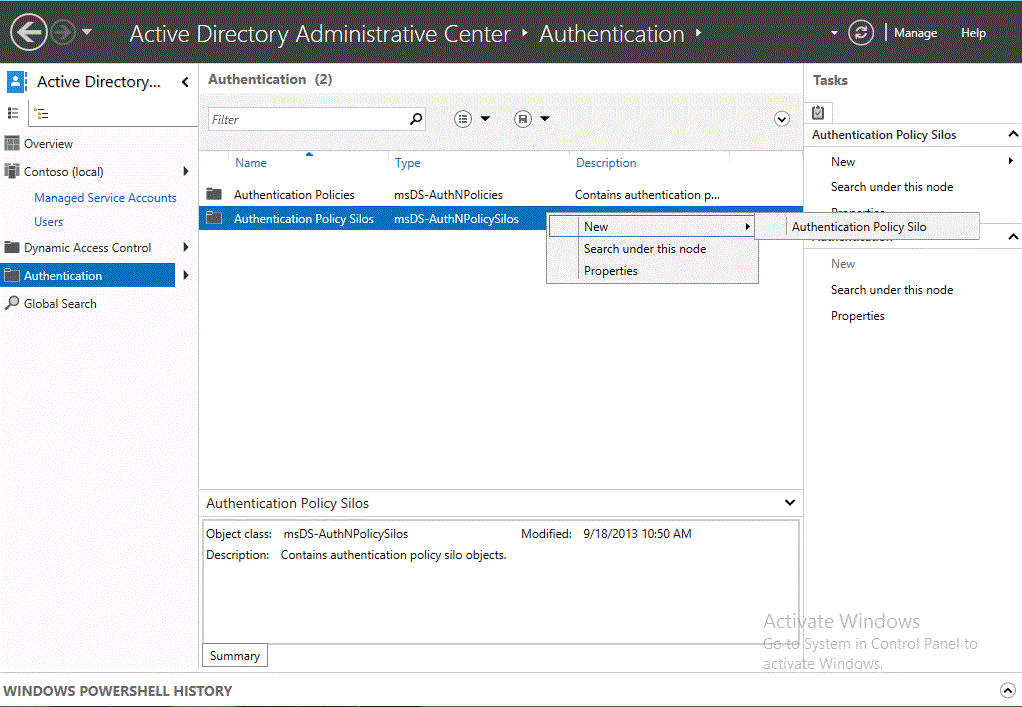
- Open Active Directory Administrative Center and select Authentication.
- Right-click Authentication Policy Silos, choose New, then Authentication Policy Silo.
- Give it a display name, then under Permitted Accounts add your Tier 0 admin accounts.
- Create the matching Authentication Policy, and set the access-control condition restricting which devices the AS exchange can come from.
- Leave it in audit mode first. Do not enforce yet.
Prefer PowerShell? The same thing in three commands:
New-ADAuthenticationPolicySilo -Name "Tier0-Silo" -Enforce:$false
New-ADAuthenticationPolicy -Name "Tier0-Policy" -Enforce:$false
Set-ADAccountAuthenticationPolicySilo -Identity t0-jsmith `
  -AuthenticationPolicySilo "Tier0-Silo" -AuthenticationPolicy "Tier0-Policy"
Audit before you enforce
Silos ship in audit mode on purpose. Nothing gets blocked, but the domain controller logs what it would have blocked. That is your dress rehearsal. Watch the Authentication logs under Applications and Services Logs, Microsoft, Windows, Authentication for a week or two.
Once the audit log is quiet and nothing legitimate is getting flagged, flip enforcement on with Set-ADAuthenticationPolicySilo -Identity "Tier0-Silo" -Enforce:$true. Enforce before you audit, and you will lock a real admin out of a real domain controller. Ask me how I know.
Putting it together
Protected Users makes the credential hard to steal, Kerberos-only and short-lived with nothing cached. Authentication Policy Silos make a stolen credential worthless anywhere but its home tier. Stack both on top of the tier model's deny-logon GPOs and you have three independent layers, each catching what the others miss. Add your Tier 0 admins to Protected Users, drop them in an enforced Tier 0 silo, keep a break-glass account out of both, and audit before you enforce. That's the whole lockdown.
What can we learn as a person
The part that got in my head is the no-caching rule. A Protected User never leaves a copy of their credential sitting on a machine after they walk away. Nothing cached, nothing lingering, nothing for someone to scrape out of memory later. When the session ends, its actually gone.
I leave versions of myself cached everywhere. A hard conversation from three years ago still runs in the background of how I talk to people now. An old rejection sits in memory and quietly authorizes a hundred smaller fears. I never set a TGT lifetime on any of it, so it just renews forever, and stuff that should have expired keeps getting used against me.
The silo idea lands the same way. My realest self doesnt need to authenticate from every room I walk into. Some of it belongs only in a couple of trusted places. So what are you leaving cached that should have expired hours ago? And where have you been letting your most valuable self sign in from hosts that never earned it?