

Last week I watched a junior admin reset a domain admin password from his regular workstation. The same machine he uses to check email, click sketchy DocuSign links, and play Solitaire on lunch. I didnt yell. I just stared at the screen, took a breath, and decided to build a tiered AD model before someone hands the whole domain to a phishing email.
If your AD is flat, this one's for you. If your domain admins log into print servers, also you. And if you've got one giant Admins group that does everything, oh boy, especially you. Here's the whole thing, tier by tier, and it stops the bleeding.
What a tiered AD model actually is
Microsoft's tier model splits your admin identities into three trust levels based on what they control. The whole point is containment. An attacker who owns a workstation should never be able to climb from there up to your domain controllers.
- Tier 0 is the identity control plane. Domain controllers, AD CS, AD FS, Entra Connect, and the accounts that run them.
- Tier 1 is every other server. File servers, SQL, Exchange, your line-of-business apps.
- Tier 2 is workstations and the people who support them. Help desk, desktop support, end-user devices.
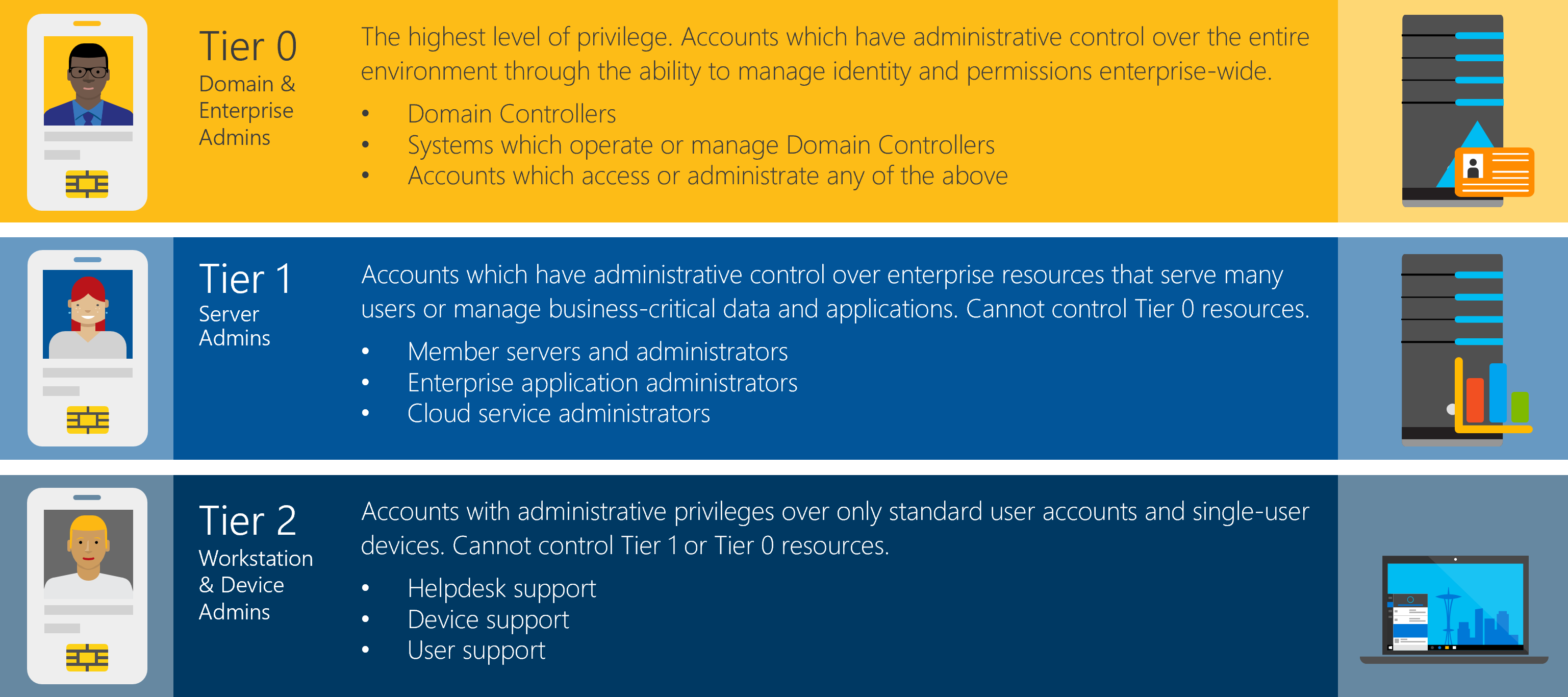
The rule that makes it work is simple. Credentials never move down. A Tier 0 account never signs into a Tier 1 or Tier 2 box. A Tier 1 account never touches a workstation. Break that rule once and the whole model falls over.
The OU structure
Start with three top-level OUs, one per tier. Under each, split admin accounts, groups, and the machines that belong to that tier.
- Tier 0 holds your domain controllers, Tier 0 admin accounts, and Tier 0 groups.
- Tier 1 holds member servers, server admin accounts, and server admin groups.
- Tier 2 holds workstations, help desk accounts, and workstation admin groups.
Your regular user accounts and department OUs sit off to the side in their own structure. Those are just people doing their jobs, not admins of anything.
The security groups
Every tier gets its own security group. Prefix them so nobody has to guess what they do. I use sg- for security group, then the tier, then the role.
sg-Tier0-Admins, full control over AD and domain controllerssg-Tier1-ServerAdmins, local admin on member serverssg-Tier2-WorkstationAdmins, local admin on workstationssg-Tier2-HelpDesk, workstation support plus delegated password reset
Those groups get pushed to the local Administrators group on the right machines through Group Policy or Restricted Groups. A member server trusts sg-Tier1-ServerAdmins and nothing else. A workstation trusts sg-Tier2-WorkstationAdmins. Domain controllers trust only Tier 0.
Roles and how many accounts each person carries
This is where people groan, because it means carrying more than one login. Good. That groan is the sound of security working. Here's how the accounts break down by role.
The System Administrator: four accounts
Your full-stack sysadmin touches everything, so they need a foot in every tier plus a normal life.
- A normal account for email, Teams, and daily work
t0-jsmithinsg-Tier0-Adminsfor domain controller workt1-jsmithinsg-Tier1-ServerAdminsfor serverst2-jsmithinsg-Tier2-WorkstationAdminsfor workstations
Four accounts, four scopes. The domain admin credential never rides along on the same machine where they read email.
The Server Admin: three accounts
Your server team doesnt need the keys to Active Directory. They manage servers and the workstations they sometimes sit at.
- A normal account for daily work
t1-accountinsg-Tier1-ServerAdminsfor serverst2-accountinsg-Tier2-WorkstationAdminsfor workstations
Notice the missing Tier 0 account. That's on purpose. A server admin who gets phished cant hand an attacker the domain, because that person was never holding it.
The Help Desk: two accounts and a delegation
Help desk lives in Tier 2. They fix laptops and reset passwords, nothing deeper.
- A normal account for daily work
t2-accountinsg-Tier2-HelpDeskfor workstation support
The password reset piece isnt a tier privilege. It's a delegation. In Active Directory Users and Computers, right-click each department's user OU, choose Delegate Control, add sg-Tier2-HelpDesk, and grant "Reset user passwords and force password change at next logon." Scope it to the department OUs they actually support, not the whole domain. Help desk can unlock the sales team without ever seeing a server.
The part that makes it real: cross-tier logon deny GPOs
Groups without GPOs are just labels on a whiteboard. The enforcement comes from Group Policy denying higher-tier accounts the right to log into lower-tier machines. Without this step, nothing actually stops a Tier 0 account from signing into a workstation.
You build three deny policies, each linked to the OU one tier down. Every policy sets these User Rights Assignments under Computer Configuration > Policies > Windows Settings > Security Settings > Local Policies:
- Deny log on locally
- Deny log on through Remote Desktop Services
- Deny log on as a batch job
- Deny log on as a service
- Deny access to this computer from the network
Link the first policy to your Tier 1 and Tier 2 OUs, denying the Tier 0 groups. Link the second to Tier 2, denying Tier 1 groups. The result is a one-way street. Credentials flow up when you deliberately elevate, never down by accident.
One warning. Test these against a pilot OU before you link them broadly. A deny right applied to the wrong group can lock real admins out of real machines, and that's a bad afternoon.
Why this setup is worth the extra logins
Attackers rarely land on a domain controller first. They land on a workstation, through a phished user or a bad download. From there they hunt for credentials sitting in memory, then hop machine to machine until they find a domain admin token. Security folks call this lateral movement, and it's how most ransomware actually spreads.
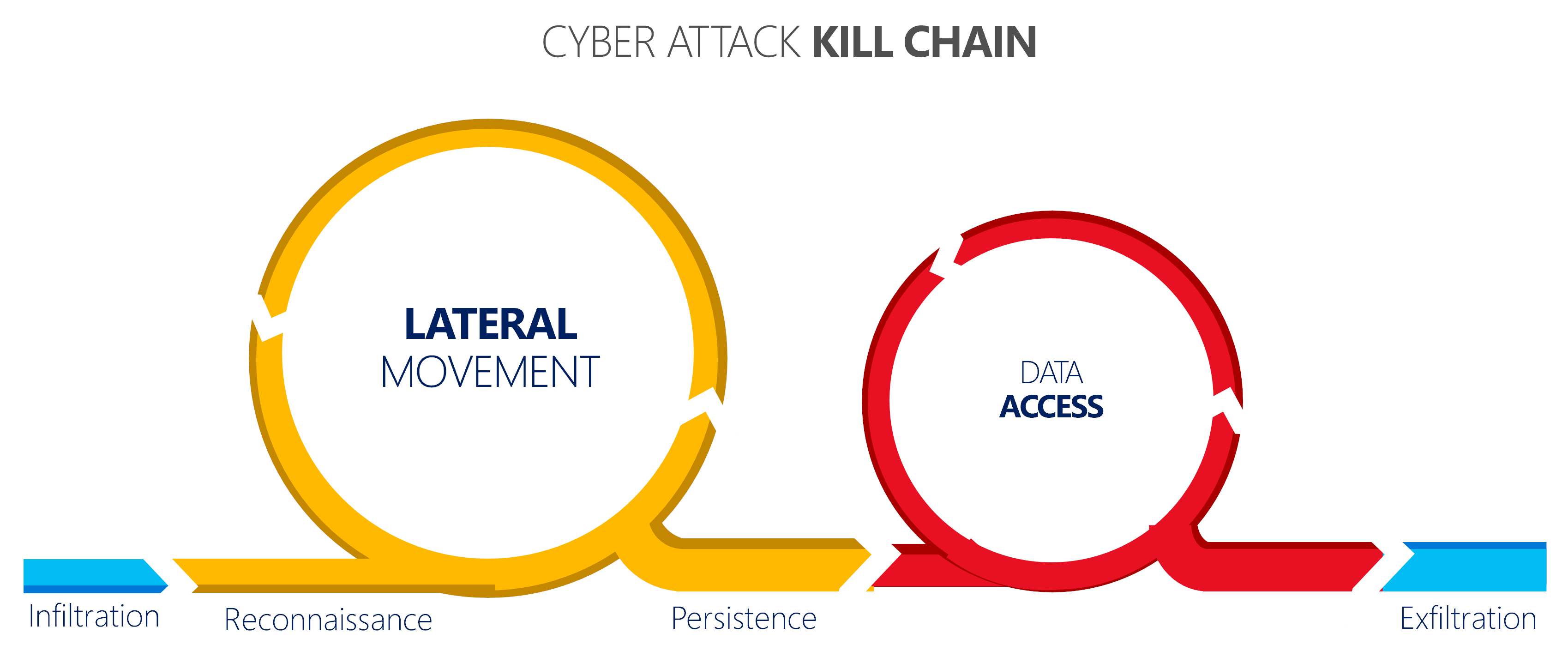
Build a tiered AD model and you cut that chain. If a Tier 0 credential never touches a workstation, then owning the workstation gets an attacker nothing but the workstation. The domain admin token they were hunting for simply isnt there to steal. You shrink the blast radius of every single compromise.
The other half of this is the clean keyboard. Microsoft calls them privileged access workstations, PAWs. The idea is that Tier 0 work happens from a hardened machine that never browses the web or reads email. Trust starts at the physical keyboard you sign in from, not the server you're reaching for.
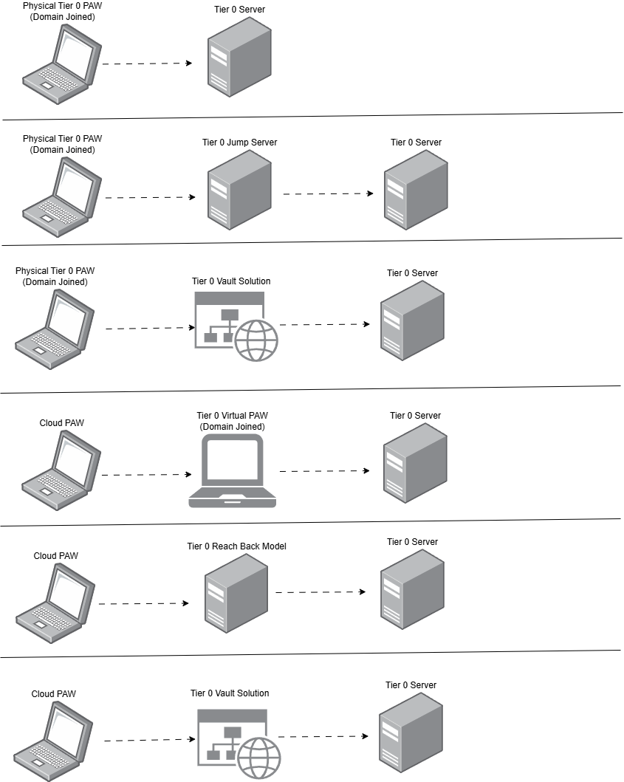
Putting it together
Three tiers, three OUs, four sg- groups, and three deny-logon GPOs. Give your system admin four accounts, your server admins three, and your help desk two plus a scoped password reset delegation. Test the deny rights on a pilot before you go wide. That's the whole model, and it turns a single compromised laptop from a company-ending event into a Tuesday.
What can we learn as a person
The thing that stuck with me building this is that the whole model runs on one boundary. Credentials dont move down. That's it. Everything else is just enforcement of that one line.
I think about how much of my own stress used to come from having no tiers at all. Work stress logged straight into my home life. A bad day with one friend leaked into how I treated my kids. One compromised area, and the attacker moved laterally through everything I had, because I never denied the logon. I was one giant Admins group that did everything, and every problem had domain rights over my whole self.
Tiering my life didnt mean caring less. It meant the hard server day stays on the server, and doesnt get to sign into the parts of me that were supposed to be off-limits. So what in your life is running flat right now? And where do you need a deny-logon rule so one bad thing stops taking down all the others?