

Had someone ask me, half joking half not, "can my company see what I'm doing on my phone since IT installed that app on it." And I get why they asked like that, half joking. Because the honest answer is "kind of, but way less than you think, and also maybe way more than you think, depends what else they've bought." Not a great one liner, so lets actually break it down.
What Intune actually sees
Intune by itself is a device management tool, not a surveillance tool, and Microsoft is actually pretty explicit about this in their own privacy documentation. What it collects as standard, required data:
- Device details, name, model, manufacturer, OS version
- Compliance and enrollment status
- App inventory, meaning the name and version of apps installed, not what you did inside them
- Admin audit logs, meaning what your IT admin did in the console, not what you did on your device
Theres also optional stuff an admin can turn on if they want, and it has to be turned on, its not default:
- Enhanced device inventory, non sensitive hardware details like CPU, disk, and memory info
- Device query, for corporate owned Windows devices only, lets an admin query specific file names and file paths on demand
- Location, and this one only applies to corporate owned devices, never personal ones, and even then its not constant tracking, its an on demand "locate this device" action, usually used for lost or stolen device scenarios
What Intune flat out never sees
This part is directly from Microsoft's own data collection documentation, not marketing spin. Regardless of what an admin turns on, Intune does not collect or allow an admin to see:
- Calling or web browsing history
- Personal email
- Text messages
- Contacts
- Passwords to personal accounts
- Calendar events
- Photos, including your camera roll
On a personal device enrolled with just app protection policies, its even narrower than that, Intune is really only aware of the managed apps and their data, the personal side of the phone stays out of view entirely. Thats the whole point of app protection policies over full device enrollment for BYOD, it draws a line around the work container instead of the whole device.
Where it changes: when Purview or Defender is in the picture
Heres the part people miss. Intune manages the device. It doesnt inspect the content flowing through it. Thats a completely different product, Microsoft Purview, and it only sees anything once a device is separately onboarded into it.
Onboarding happens through Microsoft Purview's device management center, deployed via a script, Group Policy, Configuration Manager, or yes, through Intune as the deployment mechanism. But being Intune managed doesnt automatically mean Purview onboarded, they're separate steps. If a device is already onboarded to Microsoft Defender for Endpoint, it shows up in Purview's managed device list automatically, you just have to turn on device monitoring to activate it for Endpoint DLP.
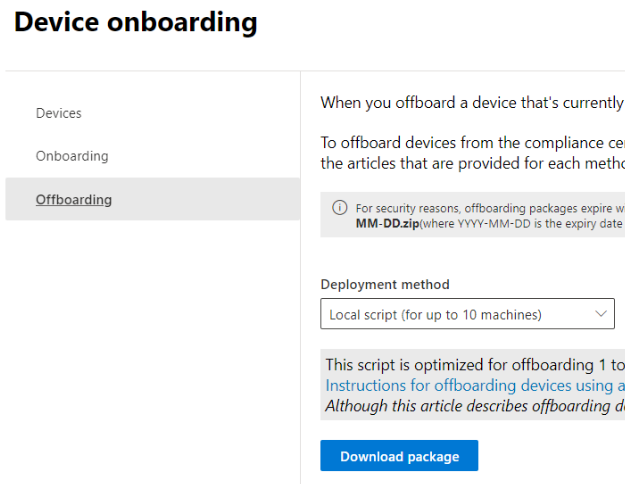
Once a device is onboarded and device monitoring is turned on, this is where the visibility actually jumps. Endpoint data loss prevention can see and act on things like:
- Copying sensitive content to USB drives
- Printing sensitive documents
- Uploading sensitive files to cloud apps through the browser
- Pasting sensitive content into third party AI sites like ChatGPT through Edge for Business
And critically, once a device is onboarded, information about these audited activities starts flowing into Activity explorer even before an admin configures a single DLP policy. So enrollment into that layer alone increases visibility, before any rule is even written.

Stack Insider Risk Management on top of that and it goes further still, correlating signals across a 90 to 120 day window to flag anomalous behavior, like a departing employee suddenly copying a bunch of files somewhere they normally dont touch. Microsoft does pseudonymize users by default in that system and gates it behind role based access and audit logs, so its not a free for all, but its a genuinely different level of visibility than plain Intune.
Putting it together
If someone asks "does Intune monitor my activity," the honest answer is Intune alone is closer to a management tool watching device health and app inventory, not a content watcher, and there's a documented list of things it flat out never touches regardless of settings. The real answer changes the moment you ask "what else has my org bought and turned on." Purview's Endpoint DLP and Insider Risk Management are the tools that actually look at content and behavior, and they require their own separate onboarding step, they dont just switch on because a device is Intune enrolled. If you want to know what's actually being watched at your org, the real question isnt "is this device managed," its "what security stack sits on top of Intune, and has anyone turned device monitoring on."
What can we learn as a person
I think the uncertainty is actually the honest part of this. I cant tell someone with total confidence "nobody is watching you" or "everybody is watching you," because it genuinely depends on layers I cant see from where I'm standing, what their org bought, what got turned on, what policy got written last month. And I think thats true of a lot of things in life too, not just IT. We want a clean yes or no answer about whether we're safe, whether we're being judged, whether something's being tracked or held against us, and a lot of the time the honest answer is "it depends on layers you cant fully see either." That uncertainty is uncomfortable, but pretending we have full visibility when we dont is worse, it just delays the discomfort instead of sitting with it.
So where in your life are you assuming a clean answer, safe or not safe, watched or not watched, when the honest truth is you genuinely dont have full visibility into it? What would it look like to just sit in that uncertainty instead of forcing a verdict?