
Someone on the helpdesk asked me "should I just wipe it" about a laptop heading back into the pool for a new hire. I asked what they actually wanted to happen after. They didnt know there was a difference. That conversation is basically why this post exists. Intune wipe vs Fresh Start trips people up constantly, and picking the wrong one costs you real time later.
Intune wipe vs Fresh Start vs Retire: the short version
- Wipe, full factory reset, removes everything, device goes back to out of box experience
- Fresh Start, removes manufacturer bloatware and reinstalls Windows, can optionally keep user data and enrollment
- Retire, removes company data and unenrolls the device, but leaves personal files and the OS alone
- Autopilot Reset, wipes user data but keeps the device enrolled and Entra joined the whole time
Each one solves a different problem. Grabbing the wrong one is how you end up re-imaging a machine that just needed a lighter touch. Or handing off a "wiped" laptop that still has someone's personal files sitting on it.
Wipe: the full factory reset
Wipe restores a Windows device to factory settings. All data, apps, and settings get removed. Once it finishes, the device sits at the out of box experience screen, ready for whoever unboxes it next.
The three wipe options
- Wipe device, but keep enrollment state and associated user account, resets the device but keeps it enrolled in Intune. MDM policies get removed, the device itself stays registered.
- Wipe device, and continue to wipe even if device loses power, the nuclear option. Overwrites free space so nothing's recoverable. Built for lost or stolen devices, but it can leave a device unable to boot again if the wipe gets interrupted.
- No options selected, the default full wipe. Removes MDM enrollment along with everything else.

Does Wipe remove BitLocker?
Not in the sense of stripping the encryption off cleanly. A wipe destroys the underlying data as part of the factory reset, so the question mostly stops mattering. With the "continue to wipe even if device loses power" option specifically, watch out. Microsoft's own troubleshooting docs warn that BitLocker encrypted devices can fail to restart afterward. If that happens, you're looking at bootable media and a manual Windows reinstall, not a quick fix.
This is different from what happens on Retire, which I'll get to in a second. Retire actively suspends BitLocker and removes key protectors because it leaves the disk intact. Wipe doesnt need to bother, since the reset itself makes the old data unreadable anyway.
Does Wipe remove Autopilot registration?
No, and this one catches people off guard. Wiping a device doesnt touch its Windows Autopilot registration at all. The hardware hash stays registered to your tenant. That's actually useful. It means a wiped device runs straight back through your Autopilot deployment profile on next boot instead of landing on a generic setup screen.
If you genuinely want the device gone from Autopilot too, that's a separate manual step. Go to Devices > Enrollment > Windows Autopilot > Devices, find the device, and deregister it there. Wipe and Autopilot deregistration are two different actions, not one.
Fresh Start: cleaning without starting completely over
Fresh Start reinstalls the latest version of Windows and strips out whatever bloatware the manufacturer shipped with it. Unlike Wipe, it gives you a real choice about what survives.
Select Retain user data on this device and the machine stays Entra joined. It automatically re-enrolls in Intune once a licensed user signs back in. It also keeps the contents of the user's home folder while clearing out apps and settings. Skip that option and the device drops all the way back to a fresh OOBE completed state, keeping only the built in local administrator account. BYOD devices get fully removed from Entra ID and Intune in that case.
Fresh Start is the one to reach for when a machine feels sluggish or cluttered. You dont actually want to lose the person's files or start enrollment over from scratch.
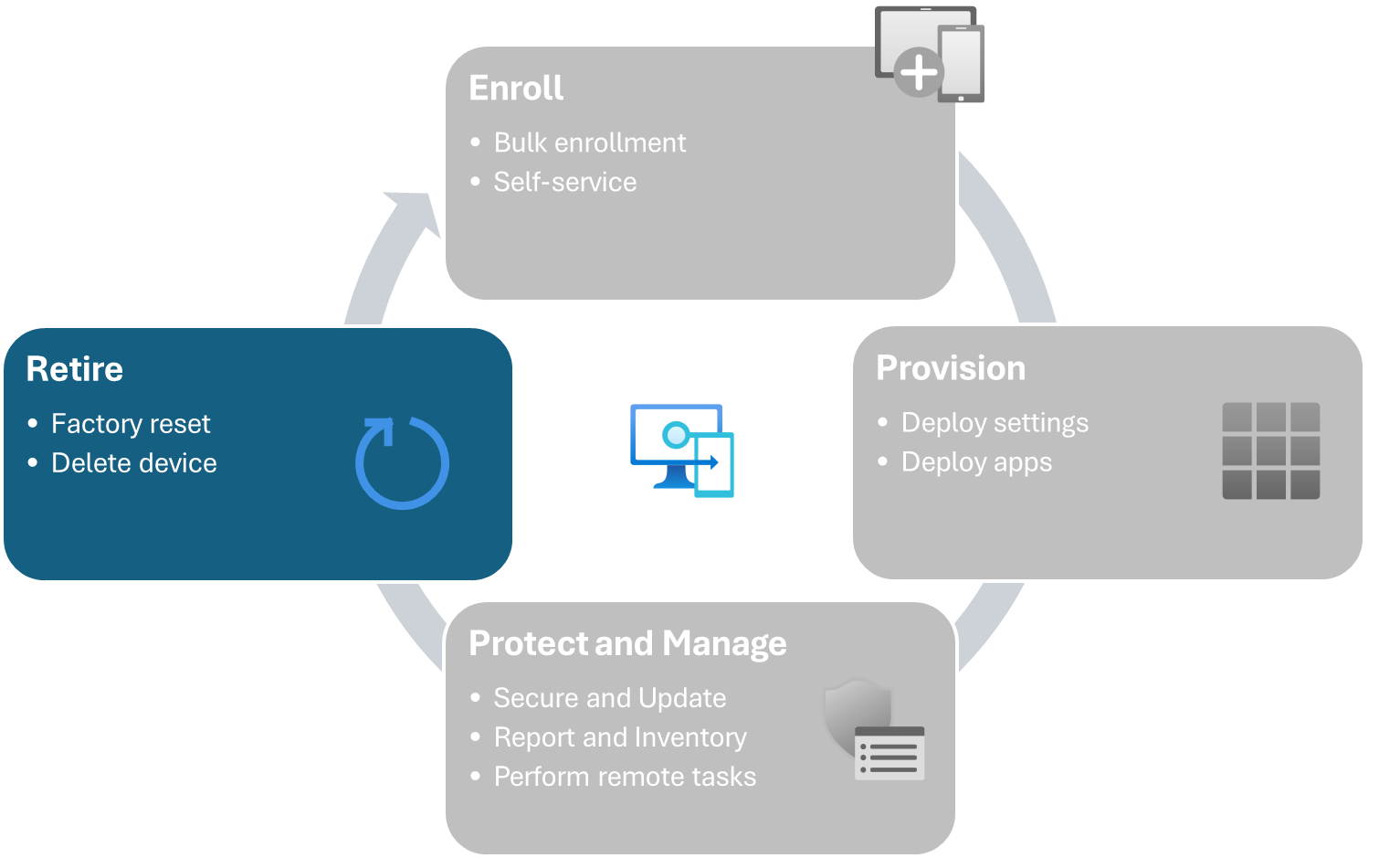
Retire: pulling company data off, nothing else
Retire unenrolls a device from Intune and strips out managed apps, profiles, and settings, but it leaves personal files completely alone. This is the one built for BYOD, when someone's leaving the company and its their own phone or laptop.
Does Retire touch BitLocker?
Yes, and this is worth knowing before you click it. If you retire or delete an Entra joined device thats BitLocker protected, Intune triggers a sync. That sync removes the key protectors and suspends BitLocker on the OS volume. Microsoft does this on purpose, to avoid leaving a device stuck encrypted with no recovery path once its Entra object disappears. Back up the BitLocker recovery key and any local admin credentials before you retire a device, just in case.
Autopilot Reset: the one people forget exists
Autopilot Reset wipes user data, settings, and apps, then reapplies your original Autopilot configuration automatically. Wi-Fi profiles, region, and keyboard settings survive the reset. The device stays enrolled in Intune and joined to Entra ID the entire time, no re-registration needed.
This is the fast option for repurposing a device between users inside the same organization. Think a shared classroom laptop going to a new student, or a desk machine getting reassigned. It skips the reimaging step entirely.

Which one do you actually want
- Device leaving the org entirely, or going to service for repair: Wipe
- Machine feels cluttered but the same person keeps using it: Fresh Start, with retain user data checked
- BYOD device, employee's leaving, only company data needs to go: Retire
- Reassigning a corporate device to a new person inside your org: Autopilot Reset
Putting it together
Weighing Intune wipe vs Fresh Start vs Retire really comes down to one question: who's keeping the device, and what needs to survive on it. Wipe assumes nobody's coming back to it. Fresh Start assumes the same person is, just with a cleaner slate. Retire assumes the person's keeping the hardware but you're taking your data back. Autopilot Reset assumes the device is staying in your fleet, just changing hands. Match the action to that answer and you'll stop reaching for the nuclear option when a lighter touch would've done the job.
What can we learn as a person
I think about Retire a lot actually, the fact that it exists as its own separate action from Wipe. Somebody at Microsoft decided that removing yourself from something doesnt have to mean destroying the whole thing. You can pull your data back out, close your part of it cleanly, and leave the rest of the person's life untouched. Not everything needs the nuclear option just because it's ending.
I dont think we're always great at that distinction with our own endings. A friendship changes shape, and we either keep pretending its exactly the same, or we wipe it completely and never speak again. There's rarely a Retire option in how we handle it. Something that lets us take our part back without torching everything the other person still has.
Where in your life are you reaching for Wipe when what the situation actually needed was Retire?