

Certificate-based Wi-Fi is the right way to keep strangers off the network. Getting there used to mean an on-premises certificate server, an NDES server, the Intune certificate connector, and a long weekend. Intune Cloud PKI gives you the certificate authority from the cloud, so devices get their certificates without any of those servers.
What Cloud PKI replaces
PKI stands for public key infrastructure. It is the system that issues certificates, renews them, and revokes them. Microsoft Cloud PKI does all of that for devices enrolled in Intune, and Microsoft hosts the pieces you used to run yourself: the certificate authority, the revocation list, and the address devices use to look up the chain. It works on Windows, macOS, iOS/iPadOS, and Android.
It is a paid add-on on top of Intune Plan 1 or Plan 2 and part of the Intune Suite. Microsoft's June 2026 update notes say Cloud PKI is also rolling out to Microsoft 365 E5. You can start a 90-day trial for up to 250 users from Intune admin center > Tenant administration > Intune add-ons > All add-ons.
Limits worth knowing up front
- A tenant gets 3 certificate authorities total, counting root, issuing, and bring-your-own CAs. A root plus an issuing CA uses two of them.
- The keys live in Azure Managed HSM, and you do not need an Azure subscription for that. CAs you build during a trial use software keys and cannot be upgraded later.
- You cannot edit a CA after you create it. Get the settings right the first time.
Cloud PKI also does not issue server certificates for your RADIUS or VPN servers, so those still come from somewhere else. It hands out certificates. Something else, usually a RADIUS server, still has to check them at the door.
Pick a model
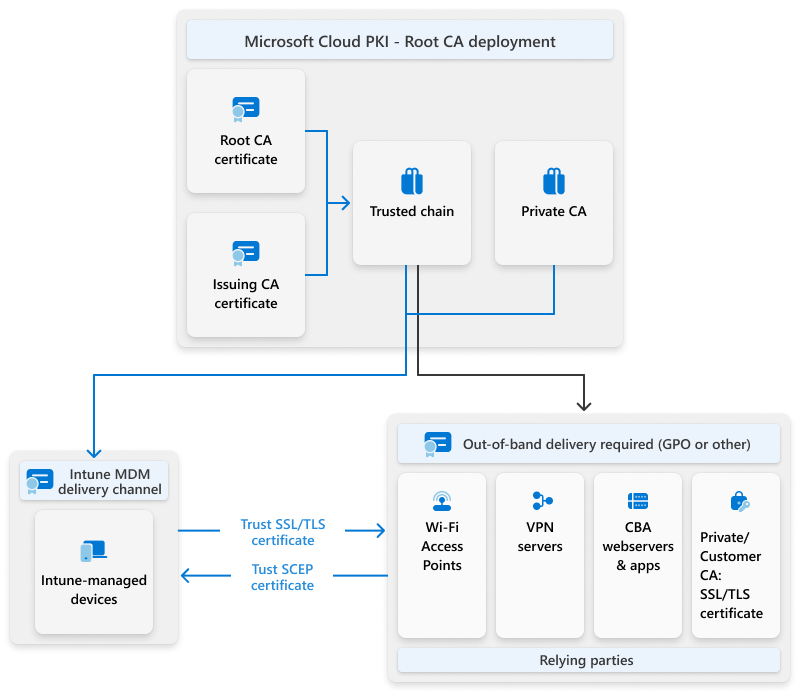
- Cloud PKI root CA: Intune creates both the root CA and the issuing CA. This is the simplest option for a company starting fresh.
- Bring your own CA: Intune creates only the issuing CA, and your existing private root, like Active Directory Certificate Services, signs it. This fits a company whose network already trusts its own root.
You can run both in the same tenant. Either way, your Wi-Fi access points, VPN servers, and RADIUS servers need the root and issuing certificates installed by Group Policy or by hand. They also need network access to the revocation list.
Create the certificate authorities
Start with the root:
- Intune admin center > Tenant administration > Cloud PKI
- Click Create and give the CA a name.
- On Configuration settings, set CA type to Root CA and pick a Validity period of 5 to 25 years.
- Pick the Extended Key Usages. For Wi-Fi and VPN sign-in, you want Client authentication.
- Fill in the Subject attributes, at minimum a Common name, and choose the Key size and algorithm.
- Review + create.
Then create the issuing CA the same way. Set CA type to Issuing CA, set Root CA source to Intune, and pick the root you just made. The issuing CA lasts 2 to 10 years and cannot outlive its root.
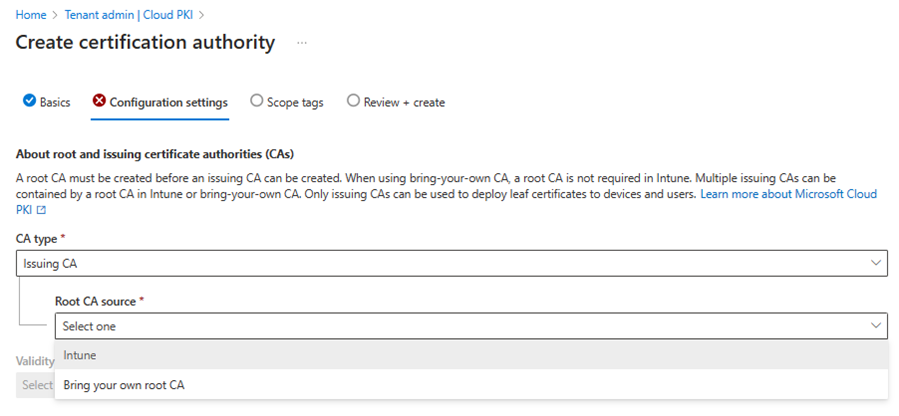
Be careful with the Extended Key Usages. An issuing CA can only use the ones its root has, and Any Purpose is not supported. Since nothing can be edited later, adding a usage you forgot means building a new CA, and you only get three.
Get certificates onto devices
Open each CA and click Properties. Download the public certificate for both the root and the issuing CA. On the issuing CA, also copy the SCEP URI. Then build three profiles under Devices > Manage devices > Configuration > Create:
- A trusted certificate profile with the root certificate.
- A trusted certificate profile with the issuing certificate. Android does not look up missing chain pieces on its own, so it needs both.
- A SCEP certificate profile that requests the device's certificate.
SCEP profile settings that matter
- Certificate type: User or Device, depending on whether the certificate follows the person or the machine.
- Subject name format and Subject alternative name: what goes in the certificate. If you use a variable like the email address and the user has no email in Entra ID, no certificate gets issued.
- Root Certificate: Pick the root's trusted certificate profile, not the issuing one.
- Extended key usage: must match what the CA has. Client Authentication for Wi-Fi and VPN.
- Renewal threshold: the percentage of life left when the device asks for a new certificate.
- SCEP Server URLs: Paste the SCEP URI exactly. Leave the {{CloudPKIFQDN}} part alone, because Intune fills it in.
Assign the trusted certificate profiles and the SCEP profile to the same kind of group. If one goes to users and the other goes to devices, the SCEP profile fails. Once certificates land, point your Wi-Fi or VPN profile at the SCEP profile for authentication.
Monitor and revoke
Open a CA and look at the Monitor tab. It counts active, expired, and revoked certificates. Click View all certificates, pick one, and click Revoke to kill it. For a view across everything, go to Devices > Monitor > Certificates. These reports update every 24 hours, so do not panic over a missing certificate from this morning.

A revoked certificate comes right back if the SCEP profile is still assigned. The device asks for a new one at its next check-in. If you want a device off the network, remove it from the assignment first, then revoke.
The revocation list is good for 7 days. Intune republishes it every 3.5 days and again every time you revoke something. Device certificates renew on their own at the renewal threshold, and an issuing CA can be renewed once it is halfway through its life.
When no certificate shows up
- The SCEP profile asks for an extended key usage that the CA does not have.
- A subject name variable, like email, is empty for that user or device.
- The trusted certificate profile and SCEP profile went to different kinds of groups.
- The SCEP profile mixes an old NDES URL with the Cloud PKI SCEP URI. Do not combine them.
On Windows, open Event Viewer and go to Applications and Services Logs > Microsoft > Windows > DeviceManagement-Enterprise-Diagnostics-Provider > Admin. Event 39 says the SCEP certificate installed. Then check the certificate itself with certmgr.msc for user certificates or certlm.msc for device certificates. On iPhones and Macs, an expired certificate can stay stuck if renewal fails. Excluding the device from the profile for a sync, then adding it back, gets it a fresh one.
Rolling out Intune Cloud PKI
Decide between a Cloud PKI root and bring your own CA, then plan your extended key usages before you click Create. Build the root, the issuing CA, two trusted certificate profiles, and one SCEP profile, and assign them all the same way. Test on one device, confirm event 39 and a working Wi-Fi connection, then roll Intune Cloud PKI out wider.
What can we learn as a person
A device trusts a Cloud PKI certificate because it chains up to a root the device already trusts. It also checks a revocation list to make sure nobody took it back.
I run my sense of worth the same way. Whether I did a good job is not something I decide on my own. I chain it up to one or two people, and if I cannot reach them to check, I assume the certificate got revoked. One day without a reply and suddenly nothing validates.
Who is the root CA for your sense of worth? And what would it take to put your own name in the trusted root store?