

I used to lose an afternoon every time I wanted a throwaway LAMP stack. Install PHP, fight the Apache config, remember which MySQL socket the thing wants, google the same permissions error I googled last year. Last week I did none of that. I opened Claude Code in an empty folder, told it what I wanted, and watched it write the files, start the containers, and hand me a working page. This is how AI and Docker fit together for that kind of grunt work, and how to build a small LAMP stack with a basic HTML page without touching a config file yourself.
What you need first
- Docker Desktop installed and running. On Windows or Mac, that is the whale icon in your tray. If it is not green, nothing below works.
- Claude Code installed and signed in. It lives in your terminal, not a browser.
- An empty folder for the project. Make one so Claude has a clean sandbox to work in.
That is the whole shopping list. You do not install PHP, Apache, or MySQL on your actual machine. They live inside containers, and Docker keeps them off your real system.
How Claude Code actually touches Docker
Claude Code runs commands in your terminal. That is the trick. It has no special Docker plugin. It just runs the same docker commands you would type, reads the output, and reacts to it. When it runs docker compose up, that command talks to the Docker daemon, and the daemon runs your containers. Claude is sitting where you normally sit.
Because it can read command output, it can debug. If a container crashes, it reads the logs, sees the error, and fixes the file that caused it. You are not copy pasting stack traces back and forth. It watches the same screen you would.
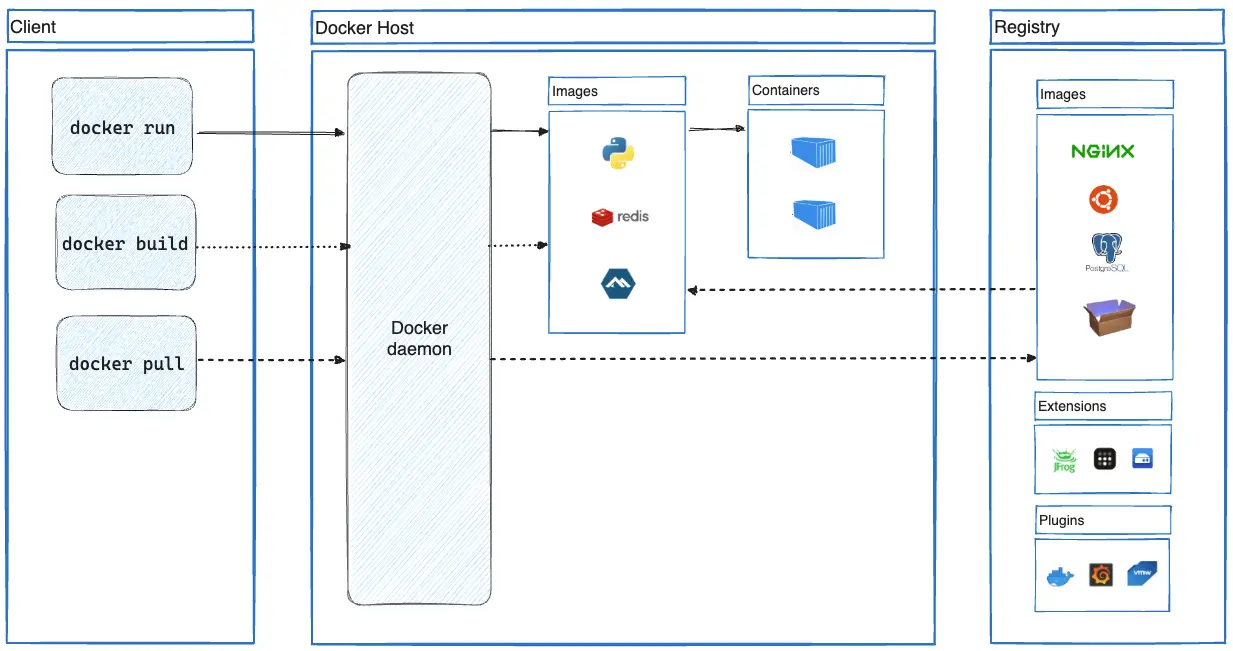
The one setting that keeps you safe
By default Claude Code asks before it runs anything. A box pops up showing the exact command, and you approve or deny it. Keep it that way while you learn. You will see every docker command before it runs, and you can say no.
There is a flag called --dangerously-skip-permissions that turns the prompts off. The name is not a joke. Do not use it for this. Watching the commands go by is how you learn what the AI is doing, and it is how you catch the one time it wants to do something you did not intend.
Building the LAMP stack
Open your terminal, move into the empty folder, and start Claude Code.
mkdir lamp-demo
cd lamp-demo
claude
Now give it a real prompt. Be specific about the parts you care about, and let it pick the boring details. Something like this works well:
Build a LAMP stack with Docker Compose in this folder. Use PHP 8.3 with Apache, and MariaDB for the database. Put the web files in a src folder mounted into the container so I can edit them live. Serve the site on localhost port 8080. Add an index.php that connects to the database and prints a success message, and a plain index.html landing page. Then bring it up and confirm it works.
The compose file it writes
Claude will write a docker-compose.yml, a src/index.php, and a src/index.html. The compose file it produces looks close to this.
services:
  web:
    image: php:8.3-apache
    ports:
      - "8080:80"
    volumes:
      - ./src:/var/www/html
    depends_on:
      - db

  db:
    image: mariadb:11
    environment:
      MARIADB_DATABASE: appdb
      MARIADB_USER: appuser
      MARIADB_PASSWORD: apppass
      MARIADB_ROOT_PASSWORD: rootpass
    volumes:
      - db_data:/var/lib/mysql

volumes:
  db_data:
The ./src:/var/www/html line is the important one. It mounts your local src folder into the container, so the file you edit on your disk is the file Apache serves. Change index.html, refresh the browser, see it. No rebuild.

The PHP page it writes
The PHP file it writes will connect to the database using the host name db, because inside the compose network the database container is reachable by its service name. That part trips up beginners, and it is nice to watch the AI just get it right. A minimal version reads like this.
<?php
$conn = new mysqli("db", "appuser", "apppass", "appdb");
if ($conn->connect_error) {
    die("Database connection failed: " . $conn->connect_error);
}
echo "LAMP stack is alive and talking to MariaDB.";
Bringing it up and checking it
Claude will offer to run the command. Approve it.
docker compose up -d
First run pulls the images, so give it a minute. When it finishes, open a browser.
http://localhost:8080/index.htmlshows your plain landing page.http://localhost:8080/index.phpshows the database success message.
You can also open Docker Desktop and look at the Containers tab. You will see two containers, web and db, both running. Click either one for logs, a shell, and the file system, all in the same window.
If the PHP page throws a connection error on the very first load, the database container is usually just still starting. Wait a few seconds and refresh. If it persists, tell Claude the exact error and let it read the logs. That back and forth is the whole point.
Tearing it down
When you are done poking at it, stop everything.
docker compose downstops the containers and keeps your database data.docker compose down -vstops them and deletes the database volume too, for a clean slate.
Your src folder stays on disk either way, because it lives on your machine, not in the container.
Wrapping up
The pattern is small and it repeats. Empty folder, clear prompt, approve the commands, check the browser. Claude Code writes the compose file and the pages, Docker runs them in throwaway containers, and the mounted folder lets you edit live. Keep the permission prompts on so you see every command, review the compose file before you run it, and use docker compose down -v when you want to start over. Once this clicks, standing up a test environment stops being a chore and starts being a sentence.
What can we learn as a person
For years I treated asking for help as cheating. If I did not build the LAMP stack by hand, config file by config file, it did not count. I carried that into more than terminals. I would white knuckle a problem alone because using the tool felt like admitting I was not smart enough to go without it.
Watching an AI stand up in twenty seconds what used to cost me an afternoon poked a hole in that story. The people I respect most are not the ones who refuse the tools around them. They are the ones who know which tool to reach for and are not too proud to reach. A calculator did not make anyone worse at math. It freed them up to think about the harder thing.
We are surrounded by tools, and I do not just mean software. A therapist is a tool. A friend who is good at the thing you are bad at is a tool, in the kindest sense. A checklist, a calendar, a person who will just sit with you. I spent a long time refusing to use any of them because I thought struggling alone was the honest way to live. So where in your life are you still doing everything by hand, when there is a tool right next to you that you have been too stubborn to pick up?