

Got asked in a meeting "so is Intune MDM or MAM, just pick one". I said "yes" and the guy actually got a little annoyed at me. Fair reaction honestly, it sounds like a dodge. But its not a dodge, its the actual answer. Intune runs both, at the same time, and they do genuinely different jobs. So lets split this into two halves and actually look at each one.
The short answer
MDM, mobile device management, manages the whole device. MAM, mobile application management, manages just the work apps and the data inside them. Leaving the rest of the device alone. Intune does both, independently or together, and which one you lean on depends on whose device it is and what you're actually trying to protect.
Part one: what MDM actually does
MDM is the "the company owns this device and manages the whole thing" side. A device gets enrolled, either the user does it themselves through Company Portal, or its automatic through Windows Autopilot, Apple Automated Device Enrollment, or Android Enterprise. Once its enrolled, Intune can see and manage settings, security, and apps across the entire device. Lost or stolen, you can wipe the whole thing.
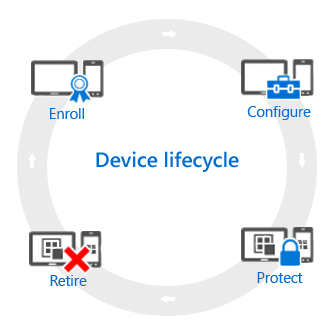
The MDM side generally moves through a lifecycle:
- Enroll, get the device registered so it can be managed
- Configure, device configuration profiles, Wi-Fi and VPN settings, password requirements, camera restrictions, that kind of thing
- Protect, multi-factor authentication, Windows Hello for Business, compliance policies
- Retire, wipe or remove the device from management when its done, lost, or reassigned
MDM is what you reach for when users need corporate Wi-Fi or VPN profiles pushed automatically, when a set of apps needs to land on the device without the user hunting for them, or when you're under a regulatory requirement that specifically calls out device level controls like encryption.
Worth knowing, Intune isnt the only MDM out there, and it doesnt have to be. Jamf and Omnissa Workspace ONE are common alternatives, especially in Apple heavy or frontline device shops. A device can only be enrolled in one MDM at a time, but plenty of orgs run Intune for most of the fleet and a different MDM for a specific pool of shared or kiosk devices. If you go that route, Intune partner compliance can still fold third party MDM managed devices into your Conditional Access decisions.
Part two: what MAM actually does
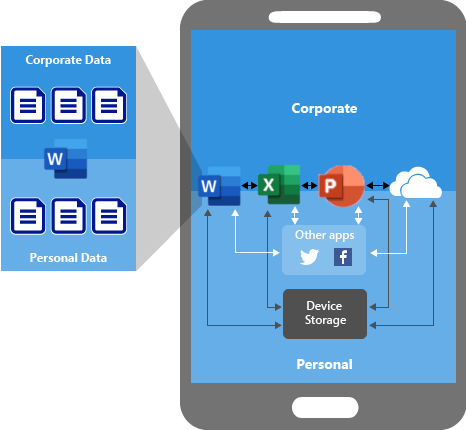
MAM is the "I dont own this device, but I still need to protect my data on it" side. Instead of managing the whole phone, Intune wraps app protection policies around specific apps, Outlook, Teams, the Microsoft 365 apps, and a long list of other supported apps. It controls things like requiring a PIN to open the app, blocking copy and paste out of it into personal apps, and preventing company data from saving to personal storage.
Without any protection in place, data just moves wherever the user drags it, work file into a personal cloud drive, company email pasted into a personal notes app, no real boundary.
There are two flavors of MAM worth knowing apart:
- MAM without device enrollment, the device isnt managed at all, maybe its personal, maybe its enrolled in a totally different MDM. Intune only ever touches the managed apps. You lose some things this way, you cant push apps to the device automatically, cant provision certificate profiles, cant hand out Wi-Fi or VPN settings, the user has to grab apps from the store themselves.
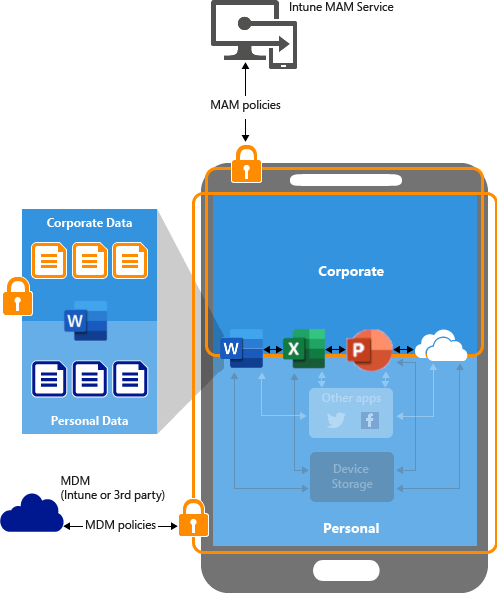
- MAM with device management, commonly called MAM plus MDM. The device is already Intune enrolled, and app protection policies get layered on top as an extra safeguard for the apps handling the most sensitive stuff.
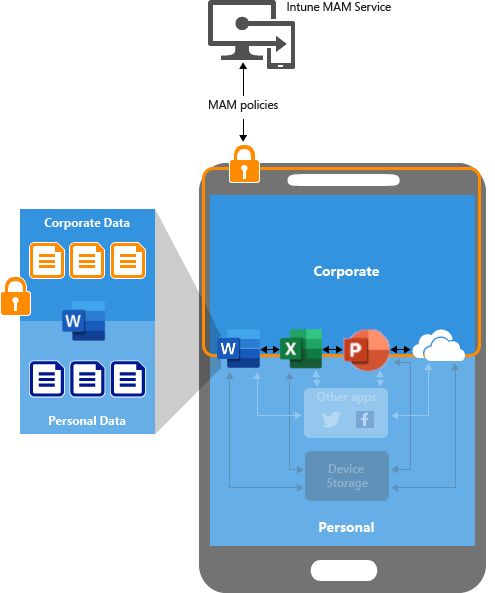
MAM is what you reach for on BYOD, when someone's using their own tablet and absolutely does not want IT managing their whole personal device, and honestly you shouldnt want that responsibility either. Its centered on user identity rather than the device itself, so the same MAM policy applies to that user regardless of what device they picked up.
Just like MDM has alternatives, MAM policies also work alongside Conditional Access to actually enforce things at sign in time, and there are other MAM approaches out there too, though Intune's is the one most tightly wired into Microsoft 365 apps specifically.
Putting it together
Corporate owned device, single user, needs the full set of policies including Wi-Fi, certs, and remote wipe, thats MDM. Personal device, BYOD, and all you actually care about is the company data inside a handful of apps, thats MAM without enrollment. Corporate device that also handles especially sensitive data in one or two apps, thats MDM with MAM stacked on top for that extra layer. Most real orgs end up running a mix of all three depending on who's holding the device.
What can we learn as a person
A computer thinks in ones and zeros. On or off, true or false, MDM or MAM, pick one. And I think a lot of us try to run our own heads the same way, because its simpler, good or bad, safe or dangerous, this person is trustworthy or they're not. But Intune itself doesnt actually work that way even though its running on machines built entirely out of ones and zeros underneath. It holds two different modes at once, applies different rules depending on context, and lets the same device be "managed" in one sense and "not managed" in another, at the same time, without anything breaking.
Reality just doesnt sort into binary as cleanly as we want it to, even the tools built entirely on binary dont actually work that way once you zoom out. Most of the stuff that stresses us out, is this relationship good or bad, was that decision right or wrong, am I doing okay or not, its almost never a clean one or a clean zero. Its usually both, in different contexts, at the same time.
So where are you forcing a one or a zero onto something that's actually running both at once? What would it look like to let it be MDM and MAM instead of picking a side?