

A pentest report crossed my desk where the whole domain fell in about twenty minutes. No cracked domain admin password, no phishing, no malware. The attacker asked a forgotten certificate server for a certificate that said "I am the domain admin," and the server politely handed it over. Thats the quiet reality of AD CS attacks. Your certificate authority is a domain admin factory, and almost nobody audits it.
Maybe you've hardened your tier model and locked down who's in Domain Admins. If you never looked at Active Directory Certificate Services, you left the back door wide open.
Why a certificate is as good as a password
Certificates authenticate. A certificate that identifies you as a domain admin logs in exactly like the real one. Worse, it doesnt care if you reset the password afterward. The certificate stays valid until it expires, which might be a year or more.
So a single misconfigured template or CA is enough. An unprivileged user can request a certificate for a privileged account and quietly become them. Security researchers cataloged these escalation paths as ESC1 through ESC8. They sit at Tier 0, right next to your domain controllers, and they rarely get a second look.
The template misconfigs: ESC1 through ESC4
Most AD CS attacks start with a certificate template that trusts the wrong people or asks too few questions.
- ESC1, a template lets the enrollee supply their own subject, has a client authentication EKU, and allows unprivileged users to enroll. Any user can request a cert as anyone, including a domain admin. The "Supply in the request" setting is the single most common cause.
- ESC2, a template has the Any Purpose EKU or no EKU at all, so an issued cert can be used for almost anything an attacker wants.
- ESC3, a template grants the Certificate Request Agent EKU, letting a holder enroll on behalf of other users.
- ESC4, the template object's own ACL or owner is weak, so an unprivileged user can rewrite the template into an ESC1 whenever they feel like it.

The fixes rhyme across all four. Turn off "Supply in the request." Strip authentication EKUs from templates that dont need them. Remove enroll rights from groups like Authenticated Users and Everyone. Require CA manager approval. And unpublish any template you dont actually use, because a template nobody can request cant be abused.
The CA and endpoint misconfigs: ESC5 through ESC8
The second half moves from templates to the certificate authority itself and how people reach it.
- ESC5, someone has control over the CA's own AD objects, like the CA computer account or the PKI containers in the configuration partition. Control those and you control the whole PKI.
- ESC6, the CA has the
EDITF_ATTRIBUTESUBJECTALTNAME2flag turned on, which lets any request specify its own subject alternative name no matter how the template is configured. - ESC7, an unprivileged user holds Manage CA or Manage Certificates rights, so they can approve their own requests or flip on the ESC6 flag themselves.
- ESC8, the web enrollment endpoint accepts NTLM over plain HTTP, so an attacker can relay a domain controller's authentication and get a certificate as that DC.

Remediation here is mostly about access and flags. Pull Manage CA and Manage Certificates rights back to a small, trusted group. Turn off the SAN flag with certutil -setreg policy\EditFlags -EDITF_ATTRIBUTESUBJECTALTNAME2 and restart the service. And if you dont use web enrollment, disable it. If you do, enforce HTTPS and Extended Protection for Authentication so relays fail.
How to actually audit AD CS attacks
You dont have to check every template by hand. Three approaches cover it.
- Microsoft Defender for Identity. If you have it, the security posture assessments flag ESC1, ESC2, ESC3, ESC4, ESC6, ESC7, ESC8, and more in Secure Score, with a remediation path for each. Certificate authority checks need a sensor on the AD CS server.
- Community auditors. Defensive PowerShell tools like Locksmith and PSPKIAudit scan your PKI and report the same misconfigurations in plain language, no license required.
- By hand. Open the Certificate Templates console (certtmpl.msc), check each template's enrollment permissions and the "Supply in the request" flag, and run
certutil -getreg policy\EditFlagson the CA to check for the SAN flag.
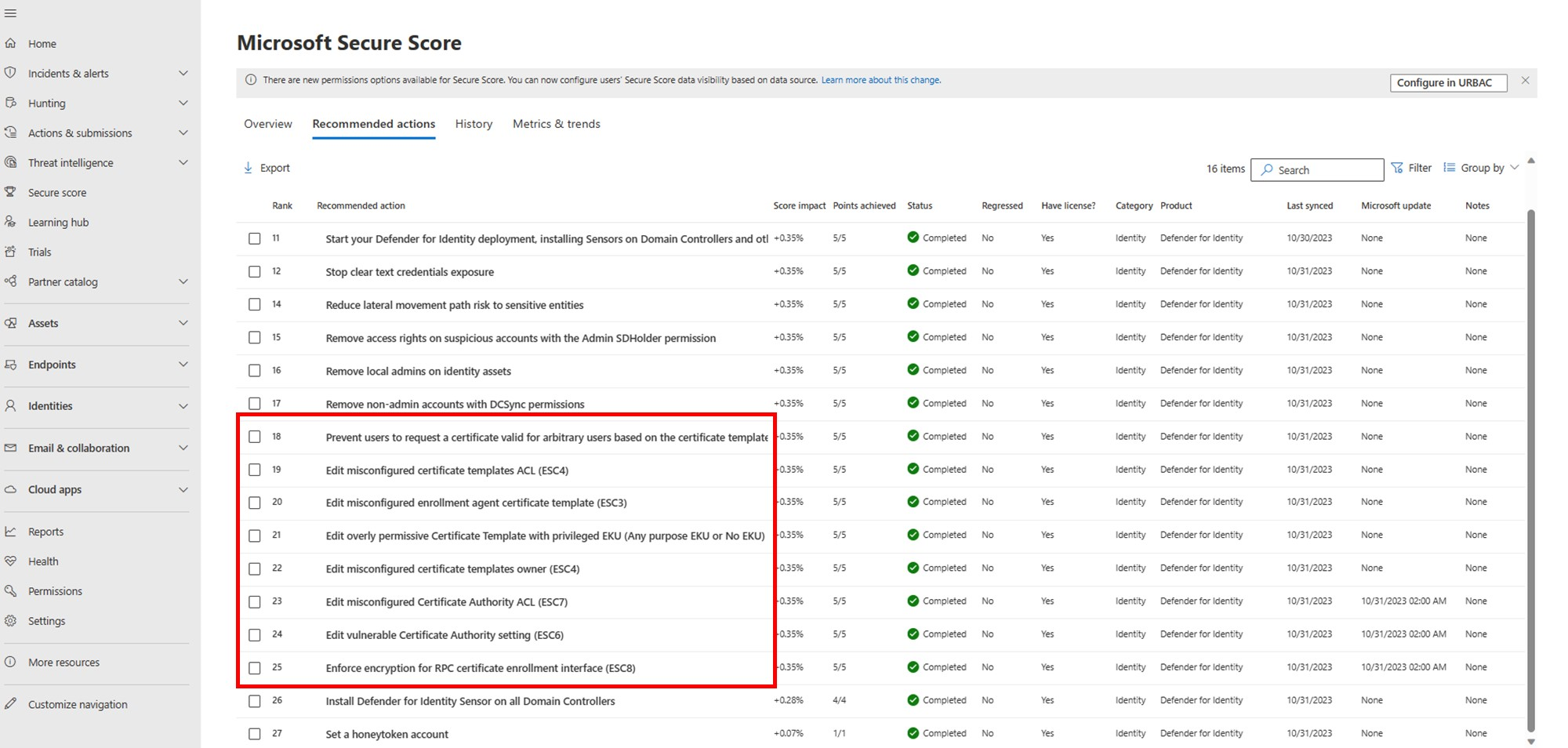
Whatever you use, run it now. Most of these misconfigs have been sitting in environments for years. Whoever stood up the CA clicked through the template wizard and never came back.
Putting it together
AD CS attacks all cash out the same way. A misconfigured template or CA lets an unprivileged user mint a certificate for a privileged account. That certificate is a login that survives password resets. Audit your templates for "Supply in the request" and loose enrollment rights, pull dangerous rights off the CA, kill the SAN flag, and lock down web enrollment. Treat your certificate authority like the Tier 0 asset it is, because an attacker already does.
What can we learn as a person
What gets me about this whole class of problem is that the front door was fine. Strong domain admin passwords, MFA, the works. The domain fell through a system nobody thought to look at, because it had been quietly issuing trust the entire time.
I have systems like that in myself. I guard the obvious doors, the big reactions, the habits I know are watching me. Meanwhile some old belief I set up years ago keeps handing out certificates in the background. It tells every new situation "this is who you are," and I never audit it. And like a certificate, it survives the resets. I can change the behavior on the surface and that old thing keeps authenticating as me anyway, because I never revoked it at the source.
So whats your AD CS? What quiet system in you has been issuing trust on your behalf for years, that you've never once stopped to audit?