

I opened the Domain Admins group at a new client last month and counted fourteen accounts. Nobody in the room could explain more than five of them. There was a service account, a former employee who left in 2022, and one called temp-admin that had been temporary since the Obama administration. That's the moment you realize you need to audit Domain Admins, because the group that owns your entire domain had turned into a junk drawer. My junk drawer has cookies beside the glue sticks. Might not want to eat those cookies.
This is the assessment side of the tiered AD model. Before you lock the door, you should know who already has a key.
Why Domain Admins is the account attackers actually want
Domain Admins isnt just another group. By default, its members become local administrators on every member server and every workstation in the domain. Own one DA account and you effectively own every machine that trusts the domain. That's why it sits at Tier 0, the identity control plane, right next to your domain controllers.
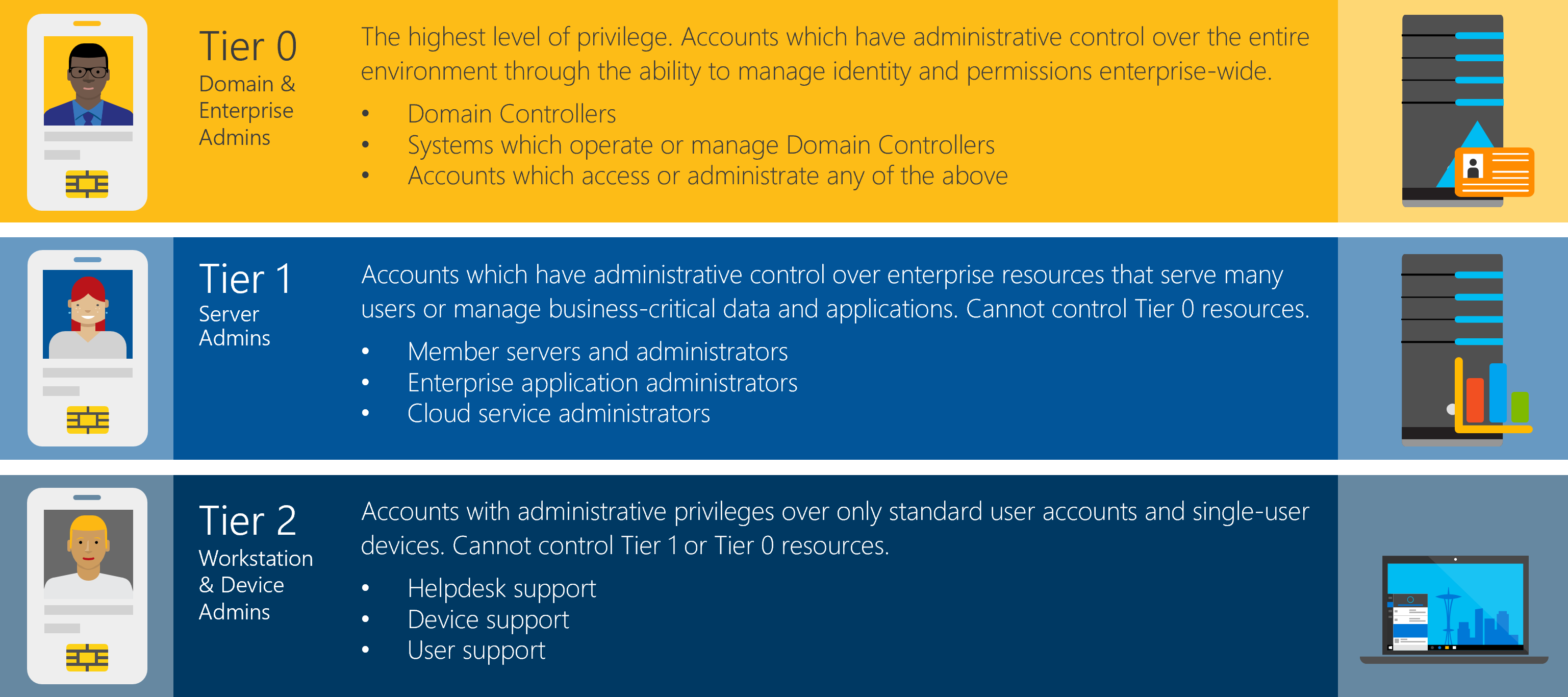
Every extra account in that group is another credential an attacker can phish, another password that can leak, another laptop that becomes a path to the whole environment. Microsoft's own guidance is blunt about it. Day to day, Domain Admins should be empty, with membership added only for a build or a disaster recovery.
How to audit Domain Admins and see who's really in it
The click path is easy. Open Active Directory Users and Computers, find the Domain Admins group, and open the Members tab. That shows you the direct members.
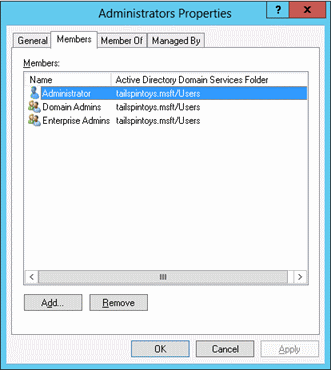
PowerShell is faster and scriptable:
Get-ADGroupMember -Identity "Domain Admins" | Select-Object name, objectClassHere's the trap though. That command only shows direct members. If someone nested a group inside Domain Admins, its members inherit DA rights while hiding one level down where the Members tab wont show them plainly. Always run it recursively:
Get-ADGroupMember -Identity "Domain Admins" -Recursive | Select-Object name, objectClassNesting is exactly how a real attacker hides. They dont add their account to Domain Admins where you'd notice. They slip an innocent-looking group in instead, and that group carries the keys.
The privileged groups people forget to check
Domain Admins gets the attention, but it isnt the only group with dangerous reach. Several others grant Tier 0 or near-Tier 0 power, and they rarely get looked at.
- Enterprise Admins, forest-wide control, should be empty except during forest-level work
- Schema Admins, can rewrite the structure of the directory itself
- Administrators (BUILTIN), the domain-level admin group that DA and EA nest into
- Account Operators, Server Operators, Print Operators, Backup Operators, legacy groups with more power than their names suggest
- DnsAdmins, historically a path to code execution on domain controllers
- Group Policy Creator Owners, can create and edit GPOs that hit your whole fleet
Audit them all in one pass instead of clicking through each:
$groups = "Domain Admins","Enterprise Admins","Schema Admins","Administrators",
          "Account Operators","Server Operators","Print Operators","Backup Operators",
          "DnsAdmins","Group Policy Creator Owners"
foreach ($g in $groups) {
    Get-ADGroupMember -Identity $g -Recursive |
        Select-Object @{n="Group";e={$g}}, name, objectClass
}
The orphans nobody talks about: adminCount and AdminSDHolder
This is the part that separates a real audit from a quick glance. Active Directory protects privileged accounts with a background process called SDProp. Every hour it stamps adminCount=1 on members of protected groups and locks down their permissions to match a template object named AdminSDHolder.
Here's the catch. When you remove someone from Domain Admins, that stamp doesnt come off. Their adminCount stays at 1, inheritance stays disabled, and the account keeps carrying a privileged-shaped security descriptor long after the privilege is gone. You end up with accounts that look normal but behave like leftovers from an access level they no longer hold.
Find every one of them:
Get-ADUser -Filter 'adminCount -eq 1' -Properties adminCount, memberOf |
    Where-Object { $_.Enabled } |
    Select-Object name, samAccountName
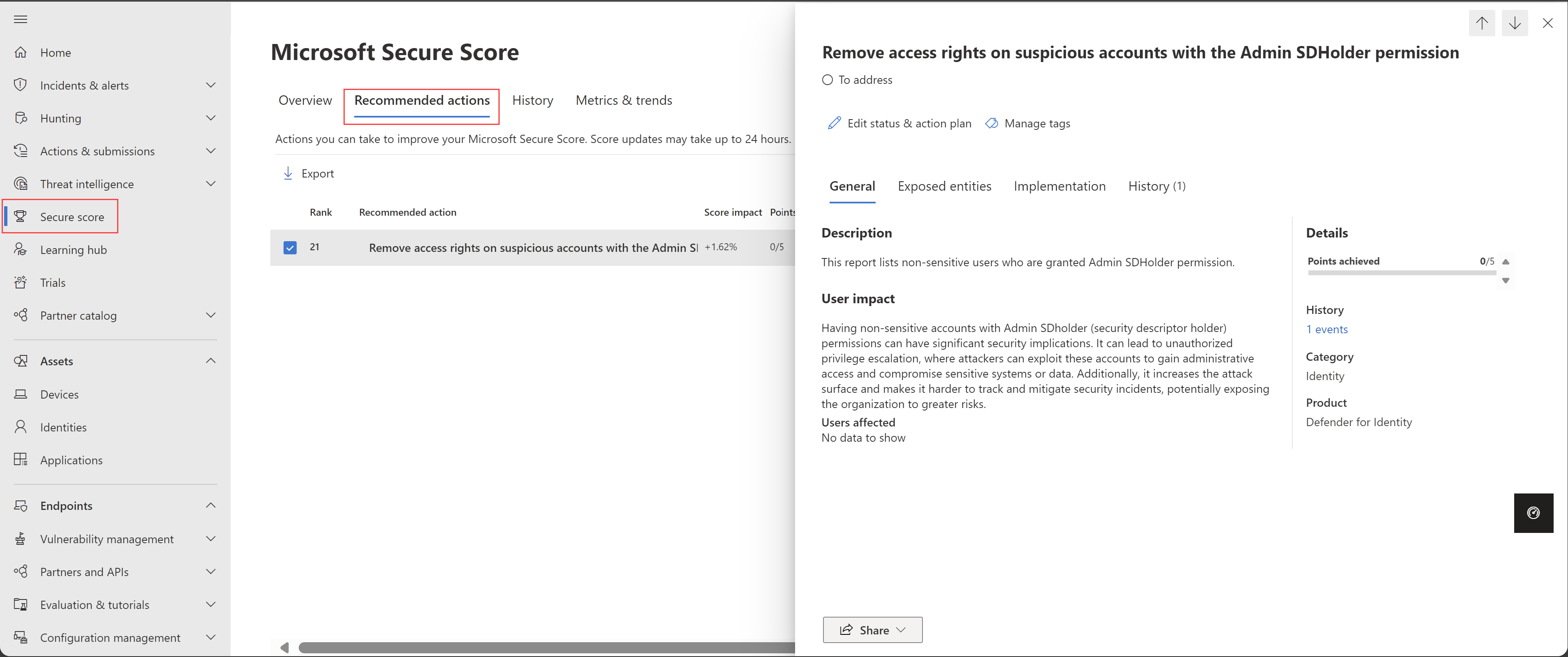
Cross-check that list against who's actually in your privileged groups right now. Anyone with adminCount=1 who isnt currently a member of a protected group is an orphan worth investigating. If you run Microsoft Defender for Identity, its secure score flags suspicious AdminSDHolder permissions for you.
What to do once you know who's in there
- Empty the group. Aim for zero standing members in Domain Admins and Enterprise Admins. Elevate only when a task genuinely needs it, then remove the account.
- Keep one break-glass account. The built-in Administrator, secured and stored somewhere safe, is your recovery path if everything else fails.
- Use time-bound elevation. A PIM or PAM tool adds someone for the change window and pulls them back out automatically.
- Alert on membership changes. Any add to a Tier 0 group should page the AD and security teams, every time.
- Clean up the orphans. For confirmed leftovers, reset
adminCountand re-enable inheritance so the object behaves like the normal account it now is.
Once the group is trimmed, go lock it down properly with Protected Users and Authentication Policy Silos so the few accounts that remain cant be stolen and replayed.
Putting it together
To audit Domain Admins properly, look past the Members tab. Run the check recursively so nested groups cant hide, sweep the other privileged groups in the same pass, and hunt the adminCount orphans that outlived their access. Then cut membership to as close to zero as your operations allow. The goal isnt a tidy list. Its a group so small and so watched that turning it into a junk drawer again would be almost impossible.
What can we learn as a person
The temp-admin account is what stuck with me. Somebody granted it access for one afternoon years ago, and it just never got revoked. The access outlived the reason for it by half a decade, and nobody noticed until it became a liability.
I carry a few of those. People I handed a level of trust to during one hard season, who still have it long after the season ended. Old resentments I granted temporary rent in my head that quietly became permanent residents. And the adminCount orphans hit even harder. Those are the roles I dont hold anymore that still shape how people treat me, and how I treat myself, a status stamped on years ago that nobody ever came back to clear.
Maybe the healthiest thing any of us can run is a membership audit on ourselves. So who still has standing access to you that they earned for a moment and kept by default? And what old adminCount is still stamped on you that nobody ever came back to reset?