

Ordered a new laptop for a remote hire last month. Dell shipped it straight to her apartment. She opened the box, connected to Wi-Fi, and signed in. I never touched the machine. Nobody on my team ever touched the machine. That whole flow is Intune zero touch deployment, and its worth actually explaining how it works instead of just saying "Autopilot handles it."
What Intune zero touch deployment actually means
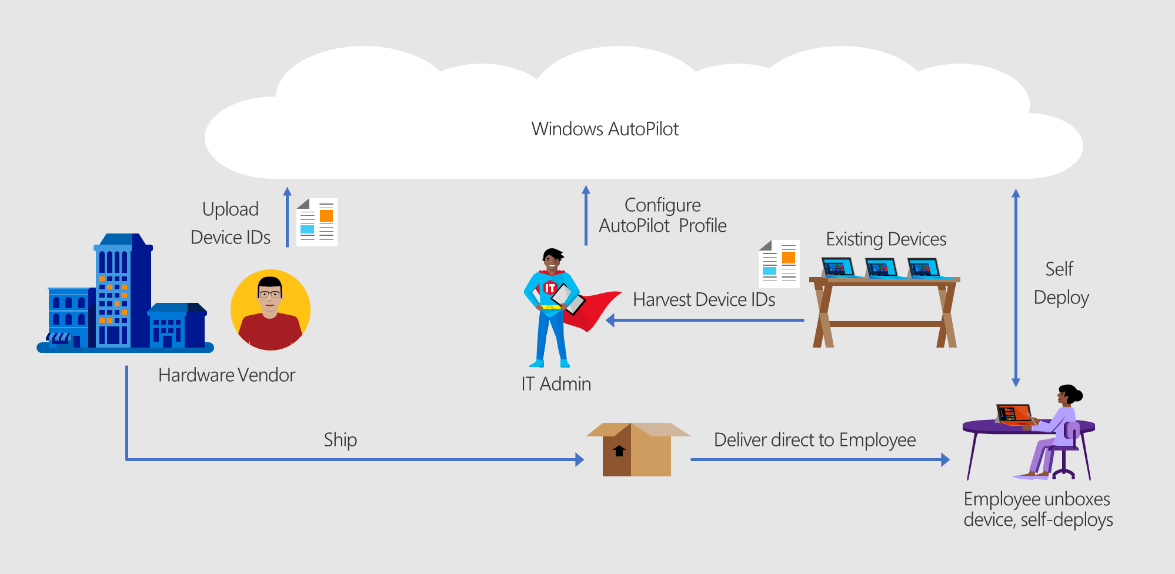
Zero touch deployment means nobody in IT ever physically handles the device. No imaging. No unboxing at the office. The manufacturer ships it directly to wherever it needs to go, often straight to the employee's house. Windows Autopilot makes this possible, but Autopilot alone isnt the whole story. The real trick is getting the device pre registered before it ever leaves the warehouse.
The hardware hash is the whole trick
Every Windows device generates a hardware hash, a fingerprint built from its manufacturer, model, and serial number. Intune needs that hash registered to your tenant before Autopilot can recognize the device. Normally someone has to boot the machine and run a PowerShell script to grab it.
OEM registration skips that step entirely. Dell, HP, Lenovo, and most major manufacturers generate the hash at the factory. They register it directly with Microsoft on your behalf, before the box ever ships. Thats the actual mechanism behind zero touch deployment. The hash exists before the device does.
Setting up drop shipping with Dell
Before Dell can register a single device for you, someone at Dell needs your permission. This step trips people up more than anything else in the whole process.
Granting Dell authorization
Dell emails a unique authorization link to your organization. A Global Administrator signs into the Microsoft 365 admin center using a cloud native account, something like yourcompany.onmicrosoft.com. That admin opens the link, checks a consent box, and selects Accept. Authorization happens instantly once they do.
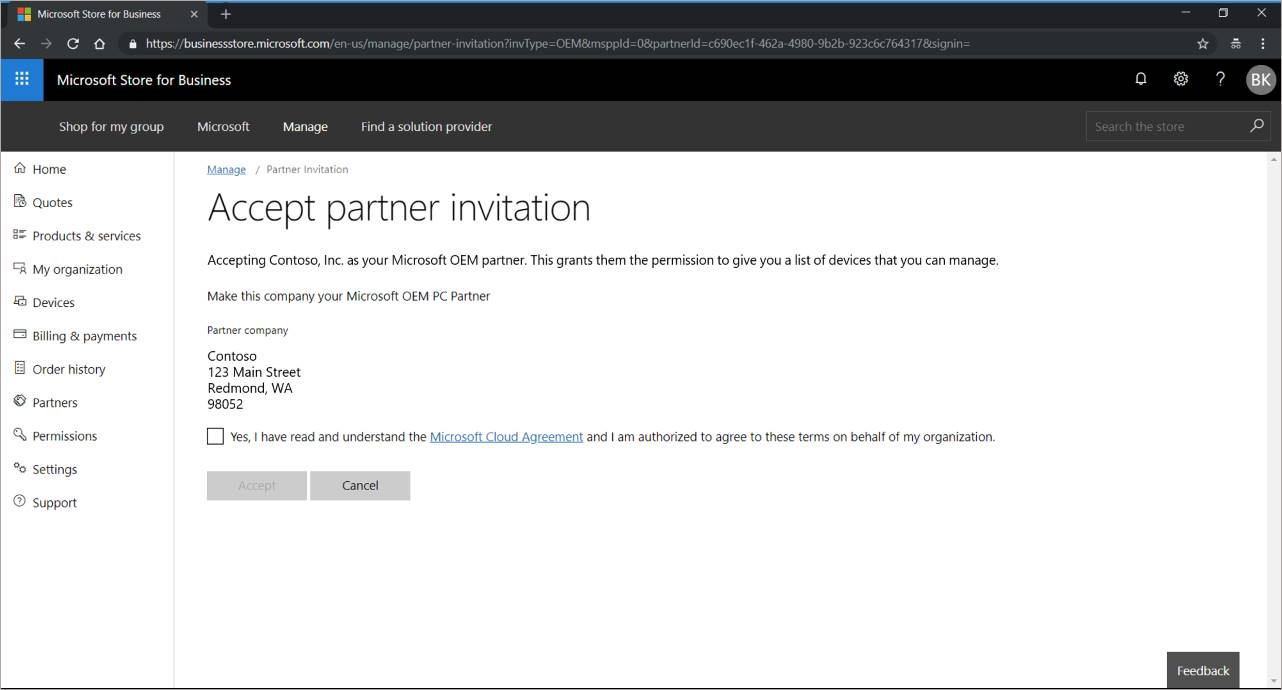
Notice this requires Global Administrator, not just an Intune admin role. Thats a genuinely high privileged role, so dont hand this task to just anyone. Also worth knowing, once you authorize an OEM this way, you cant remove them yourself later. Revoking access means emailing Microsoft's support alias directly.
What happens after authorization
Once authorized, Dell registers every device you order automatically. No CSV files. No PowerShell scripts. No IT person unboxing anything first. The hash gets written to Microsoft's Autopilot database and tied to your tenant, all before the device ships. Dell never gets access to your actual tenant, they're only writing to Microsoft's registration database on your behalf.
What still needs setting up on your end
Registration only gets the device recognized. You still need a deployment profile assigned to whatever group that device lands in, defining things like deployment mode and whether the Enrollment Status Page blocks device use until apps finish installing. Ive covered building that profile in detail elsewhere, so I wont repeat all of it here. Just know registration and the profile are two separate steps, and skipping the profile means the device boots to a normal, unmanaged Windows setup instead of your branded OOBE.
The actual drop ship workflow
- Authorize Dell once, using a Global Administrator account
- Build your Autopilot deployment profile and Enrollment Status Page ahead of time
- Order the laptop through Dell, specifying your tenant during the order
- Dell registers the hash and ships straight to the new hire's address
- The employee opens the box, connects to Wi-Fi, and signs in
- Windows Autopilot takes over from there, joining Entra ID and enrolling in Intune automatically
Nobody on your team touches a single cable in that entire sequence.
Gotchas worth knowing before you rely on this
- Confirm your reseller or Dell account rep actually supports OEM registration for your specific device line, not every SKU qualifies
- Double check the tenant ID gets attached correctly at order time, a wrong tenant ID means the device registers somewhere other than your organization
- Build and test your deployment profile before the first real shipment goes out, dont let a new hire be your test case
- Remember you cant self service remove OEM authorization later, so get the right admin to grant it in the first place
Putting it together
Intune zero touch deployment is really two things stacked together. Dell registers the hardware hash before the device ships, and your Autopilot deployment profile tells that device what to do the moment it powers on. Get the authorization done once, get your profile built and tested, and every laptop after that ships straight to whoever needs it without IT ever unboxing a single machine.
What can we learn as a person
What gets me about OEM authorization is that you're trusting a company you'll never actually talk to with a piece of your process. Some person at Dell you'll never meet handles a step that used to require your own hands on the keyboard. And once you grant that trust, you cant even take it back yourself, you have to ask Microsoft to do it for you.
Honestly, a lot of life runs the same way. We hand pieces of our process to people we'll never meet, a pharmacist filling a prescription, an engineer who built the bridge we drive over, a stranger raising our kid's classmate. We dont personally verify most of it. We just trust the registration happened correctly somewhere upstream.
What's a piece of your life running on trust you never actually verified? And has it been working out fine anyway?